
What If Your Dead Leads Started Calling Themselves Back?
"What if every dead lead in your CRM got called automatically within 30 seconds of replying to a message, without you lifting a finger?"
If you run a painting business, your revenue would look completely different. But here's the reality most contractors are living with right now:
- Most painting contractors lose 60 to 70% of leads simply because follow-up stops after the first or second attempt.
- Commercial painting leads are even harder. Longer sales cycles, multiple decision makers, and weeks between touchpoints mean most deals die in silence.
- The real problem isn't that the leads are dead. The follow-up system is dead.
The good news: you can fix it with AI automation. This post breaks down the exact three-module system painting contractors are using in 2026 to turn cold CRM contacts into booked jobs, automatically.
The 3-Module AI Lead Reactivation System
This isn't a single tool or a hack. It's a complete system built from three connected modules that work together from the moment a lead enters your pipeline to the moment a meeting is booked:
- Module 1: Commercial CRM Setup (GoHighLevel)
- Module 2: AI Voice + SMS Lead Reactivation
- Module 3: LinkedIn Prospecting Automation
Together, these three modules handle every stage of the commercial lead lifecycle: outreach, follow-up, reactivation, and booking, without your team lifting a finger until it's time to show up for the meeting.
Most painting contractors lose commercial leads before the follow-up problem even starts. The issue is structural: they're running residential and commercial leads through the same pipeline, and that doesn't work.
Residential sales are fast. A homeowner decides in days. Commercial deals take weeks or months, involve multiple stakeholders, and require a completely different set of touchpoints. If your CRM doesn't reflect that, you'll drop the ball every time.
Residential vs Commercial: Why Separate Pipelines Matter
Residential leads are volume-driven. Commercial leads are relationship-driven. Mixing them in one pipeline means your follow-up cadence is wrong for both. Your commercial pipeline in GoHighLevel (GHL) needs to be purpose-built for how these deals actually close.
The 9 Commercial Pipeline Stages
Here's the exact pipeline structure to set up in your CRM:
New Commercial Lead: Contact enters the system
Contacted: First outreach made
Needs Assessment / Discovery Call: Qualifying conversation completed
Site Visit Scheduled: In-person walkthrough booked
Estimate Sent: Proposal delivered
Follow-Up: Post-estimate check-ins are active
Negotiation: Pricing or scope discussions underway
Won, Project Scheduled: Deal closed, work on the calendar
Lost, Reason Tagged: Lost with a reason logged for future targeting
Custom Fields That Drive Smarter Follow-Up
Beyond pipeline stages, you need custom fields to store the information that drives personalized outreach:
- Square footage of the property
- Building type (office, retail, multi-family, etc.)
- Budget range
- Property manager contact details
When this data is captured, your automations can personalize every message based on what the prospect actually cares about, not a generic follow-up template.
Automated Notifications and Task Creation
Set up internal notifications and automated task creation so your team always knows when a lead moves stages, when a follow-up is due, and when a meeting is confirmed. The CRM becomes the single source of truth, not a spreadsheet, not someone's inbox.
Module 2: AI Voice + SMS Lead Reactivation, The Engine of the System
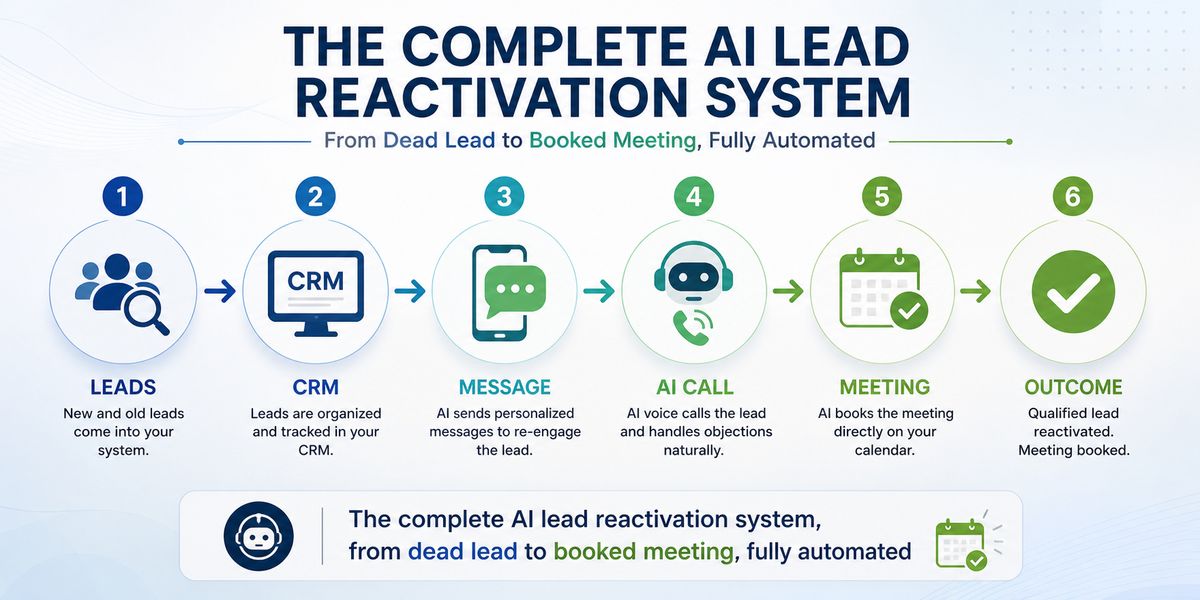
This is where the real work happens. Your dead leads, contacts who went cold after a quote, stopped responding to emails, or slipped through the cracks months ago, get systematically reactivated without any manual work from your team.
Here's the full step-by-step flow:
Step 1: Import and Segment Dead Leads. Dead leads are pulled from your CRM and sorted into batches based on how old they are, what stage they were at, and what type of property they represent.
Step 2: Automated SMS and Email Go Out. Each batch receives a personalized outreach message. Simple, non-pushy, designed to get a response, not close a deal.
Step 3: The AI Reads Every Reply. The system classifies every response in real time:
- Positive reply: AI places an outbound call within 30 seconds
- Maybe positive: AI calls and handles objections
- Negative reply: Lead enters a long-term follow-up sequence and stays in rotation
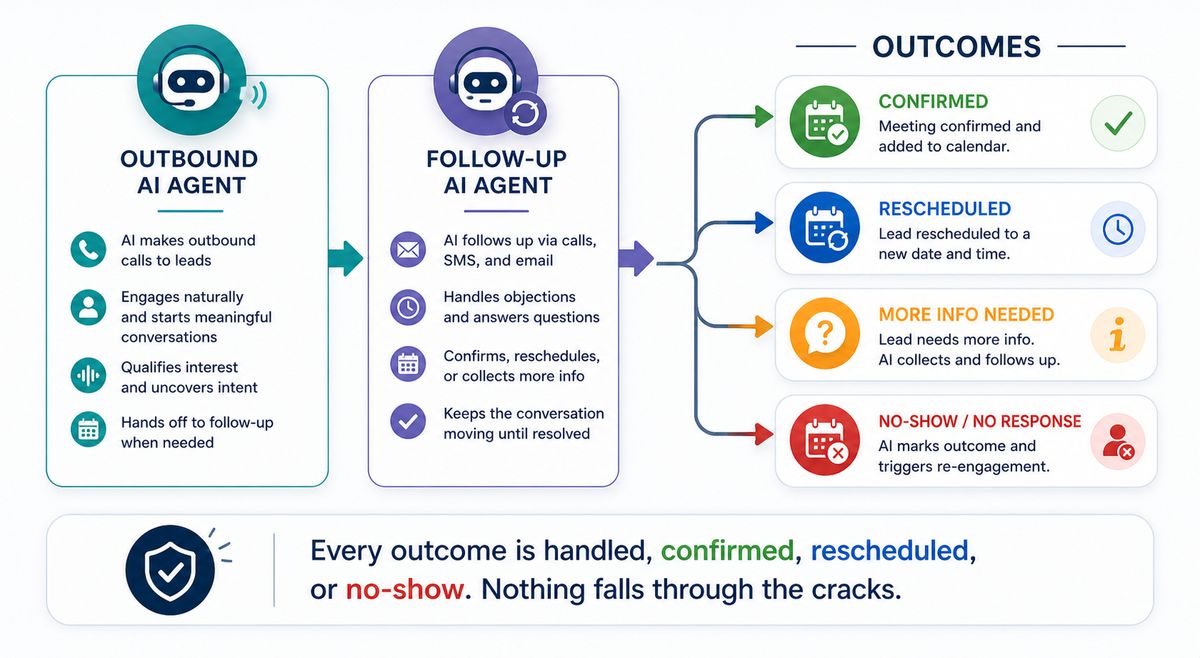
Step 4: Outbound AI Voice Agent. When a positive signal is detected, the AI agent calls the prospect and:
- Pitch your painting service in natural, conversational language
- Handles common FAQs (timeline, pricing, process)
- Book the meeting in real time while the prospect is on the call
- Sends meeting details to both the prospect and your team automatically
- Saves everything to the CRM: call recording, outcome, next steps
Step 5: Follow-Up AI Agent (30 Minutes Before the Meeting) A second agent activates before every booked meeting:
- Confirms the prospect is still available
- Sends a confirmation message with meeting details
- Reschedules in real time if the client can't make it
Step 6: Three Outcomes, All Handled Automatically
- ✅ Meeting confirmed: Client shows up, your team is ready
- 🔄 Rescheduled: New time booked, owner notified instantly
- ❌ No show: A No-Show Voice Agent re-engages the prospect within minutes
Nothing falls through the cracks. Every outcome is anticipated and handled before your team even notices.
Module 3: LinkedIn Prospecting on Autopilot
AI reactivation is powerful, but only if you have leads to reactivate. LinkedIn is the highest-quality source of commercial painting leads available today, and most contractors aren't using it at all.
Why LinkedIn Works for Commercial Painting
The decision makers for commercial painting contracts, property managers, facility managers, asset managers, and commercial real estate owners are active on LinkedIn. They're responsible for maintaining buildings, and they have budgets to spend. They're not searching Google for painters. They're hiring from their professional network.
Finding Decision Makers Without Manual Searching
Instead of spending hours scrolling LinkedIn, the system uses automated search and filtering to identify the right contacts in your target verticals:
- Banking: Branch managers and regional facilities teams
- Office Buildings: Property management companies
- Commercial Real Estate: Asset managers and building owners
- Retail: Facilities and operations managers
Automated Connection and Follow-Up Sequence
Once targets are identified, an automated sequence handles:
Sending a personalized connection request
Following up with a value-first message after connecting
Nurturing non-responders with 2 to 3 additional touchpoints over 2 to 3 weeks
The messaging is written to start a conversation, not pitch immediately. It builds familiarity before asking for anything.
Everything Logs Back to Your CRM
Every LinkedIn conversation, reply, and connection automatically syncs to GHL. You can see the full history of a contact across LinkedIn, SMS, email, and phone, all in one place. No manual data entry. No lost context.
The Full System Working Together
Here's what the complete customer journey looks like when all three modules are running:
LinkedIn Prospect > CRM Lead > Goes Cold > AI SMS Reactivation > AI Call Within 30 Seconds > Meeting Booked > Job Won
Your team doesn't touch any of this until the meeting is on the calendar. The AI handles outreach, follow-up, reactivation, booking confirmation, and rescheduling. There's no manual follow-up, no leads forgotten, no revenue left on the table.
Every step is automated. Your team only shows up for the meeting.
Frequently Asked Questions
1. How do painting contractors get more commercial leads?
The most effective approach in 2026 combines LinkedIn outreach targeting property and facility managers with a structured CRM pipeline. Most contractors focus on residential volume and miss the higher-ticket commercial market entirely. Building a dedicated commercial pipeline and running automated outreach sequences on LinkedIn consistently generates better-qualified leads than any paid ad channel.
2. Can AI automatically call dead leads for my painting business?
Yes, and this is exactly what the Module 2 system is built for. When a dead lead responds to an automated SMS, an AI voice agent calls them within 30 seconds, pitches your service, handles objections, and books a meeting. The call happens faster than any human on your team could pick up the phone.
3. What CRM is best for painting contractors in 2026?
GoHighLevel (GHL) is the best CRM for painting contractors running automated follow-up and AI reactivation. It supports custom pipelines, SMS and email automation, AI voice integration, LinkedIn data logging, and call tracking, all in one platform. It's purpose-built for the kind of multi-touchpoint commercial sales cycle that painting businesses deal with.
4. How do I automate follow-up after sending a painting estimate?
Set up a GHL automation trigger that fires when a lead moves to the Estimate Sent stage. From there, the system sends a follow-up SMS after 24 hours, an email after 48 hours, and a task notification to your team after 5 days of no response. If the lead goes fully cold, they get added to the reactivation batch that Module 2 handles on an ongoing basis.
5. What is AI lead reactivation, and how does it work?
AI lead reactivation is the process of re-engaging old, unresponsive leads using automated messaging and AI voice calling. The system sends a segmented SMS or email to dead leads, reads every reply, and triggers an AI voice call within seconds of a positive response. The AI handles the full conversation: pitch, objections, and booking, without any human involvement.
6. Is automated calling (AI voice) legal for business outreach?
Generally yes. Outbound AI voice calling to business contacts is legal when the prospect has opted in or when you're calling in a B2B context. Regulations vary by country and state, so it's important to work with a provider who builds compliance into the system. Always consult with a legal professional to confirm compliance in your specific market.
7. How many dead leads can this system reactivate?
Results vary by database size, lead age, and source. Still, contractors running this system typically see 15 to 35% of dead leads respond to the initial reactivation message, with a meaningful portion converting to booked meetings. Even a database of 200 cold leads with a 20% response rate gives you 40 new conversations to work with, automatically.
Ready to Stop Chasing Leads Manually?
Still chasing leads manually? Book a free 30-minute audit call, and we'll show you exactly how many dead leads in your CRM can be turned into booked jobs this month.
We'll audit your current follow-up process, identify the dead leads with the highest reactivation potential, and show you exactly how the system would work for your painting business. No obligation, no pitch, just a clear breakdown of what's possible.