
HVAC automation software generally falls into two layers.
Field service platforms such as ServiceTitan, Jobber, Housecall Pro, FieldEdge, and BuildOps manage scheduling, dispatch, job records, quotes, invoices, and payments. AI and workflow tools handle what happens around those jobs: answering calls, qualifying enquiries, following up on estimates, updating the CRM, and reactivating older leads.
The right place to start depends on where the business is losing time or revenue. A weak schedule and incomplete job records point to a field-service problem. Missed calls, forgotten estimates, and inconsistent follow-up point to a different need: an automation layer that works with the existing FSM instead of replacing it.
Table of Contents
What HVAC automation software actually covers
HVAC field service software compared
Built-in AI versus a separate automation layer
What to buy first
Worked example: the cost of missed calls
How FatCamel AI helps HVAC businesses
FAQ
What HVAC Automation Software Actually Covers
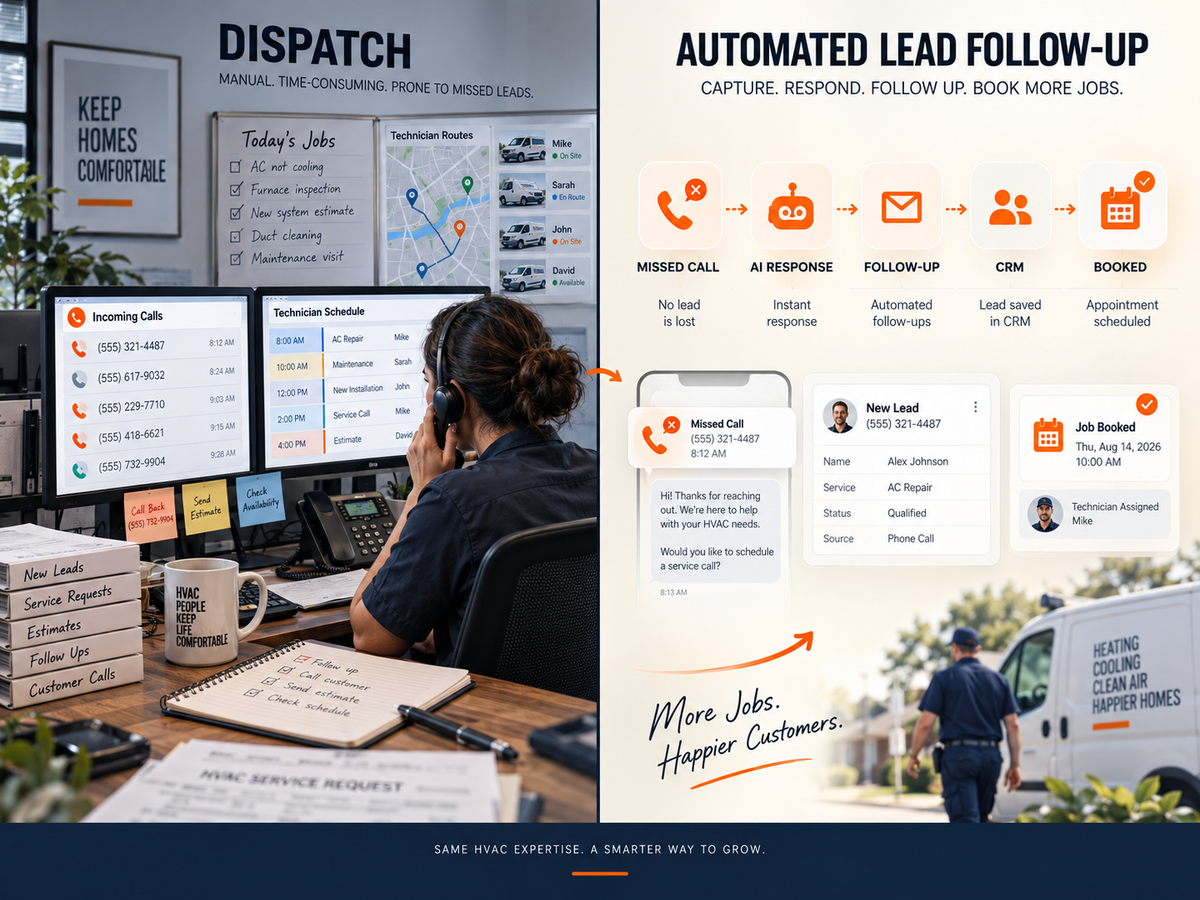
The term “HVAC automation software” can refer to several things. Building controls and energy management are one category. This guide focuses on the software an HVAC contractor uses to manage the office, field operation, and customer pipeline.
Field Service Management (FSM)
Field service management software is the operational foundation. It can hold technician schedules, dispatch information, work orders, customer history, estimates, invoices, payments, reporting, and, depending on the platform, maintenance agreements.
When those records are incomplete or scattered across different systems, everything from billing to management reporting becomes harder to manage.
Revenue and Workflow Automation
Workflow automation handles the work that happens around the job.
That might mean responding to a website enquiry, answering a 9 p.m. no-cool call, reminding a homeowner about an estimate, alerting a salesperson, requesting a review, or reaching back out to an older contact in the pipeline.
Several FSM vendors now offer AI receptionists and follow-up features. The important question is whether those features actually fit the way the office operates.
An AI receptionist can help capture a missed call, but it will not fix a broken dispatch process. Likewise, a dispatch board can organize technician schedules, but it will not automatically chase every estimate sitting in the pipeline.
Read More: Best AI Tools for HVAC Contractors in 2026 (Ranked by What Actually Books Jobs)
HVAC Field Service Software Compared
There is no single HVAC platform that fits every contractor. The right choice depends on company size, service model, existing systems, integrations, and how much operational complexity the team needs to manage.
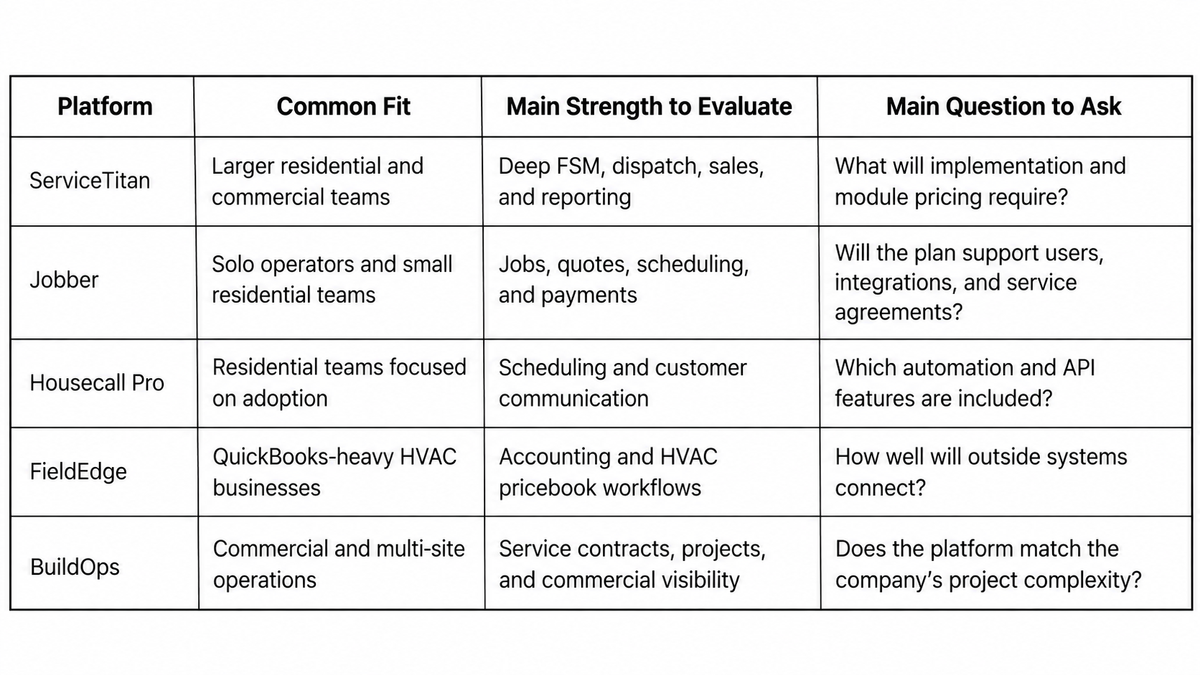
ServiceTitan
ServiceTitan is built for established contractors with a lot to coordinate. Its platform covers areas such as scheduling, dispatch, pricebooks, sales, service agreements, reporting, and technician management.
That depth can make sense for larger residential companies or commercial operations with several teams.
Implementation, training, pricing, and adoption deserve just as much attention as the feature list. A smaller contractor should consider whether the platform’s complexity matches the way the business actually operates today.
Consider: Implementation requirements, contract terms, module pricing, training, and included features.
Jobber
For a smaller residential contractor, Jobber can bring scheduling, jobs, client communication, quotes, and payments into one system instead of spreading them across paper schedules, spreadsheets, and separate tools.
Before committing, it is worth testing the less obvious workflows as well, including service agreements, reporting, and integrations.
Consider: User limits, integrations, reporting, and higher-tier workflows.
Housecall Pro
Housecall Pro combines scheduling, dispatch, online booking, estimates, payments, reminders, and customer communication in one system.
For a contractor looking to reduce the number of separate tools used by the office, that can simplify day-to-day operations.
The important thing is to test the workflows that matter most to the business. Estimate follow-up, old-lead reactivation, unusual routing, and other less routine processes may require closer evaluation.
Consider: Automation limits, service plans, reporting, API access, and add-on pricing.
FieldEdge and BuildOps
FieldEdge may be relevant for HVAC businesses that rely heavily on QuickBooks and want their field-service and accounting workflows connected.
BuildOps is more focused on commercial contractors managing service contracts, projects, and multiple sites.
For either platform, an automation project should begin by understanding how the system exposes data and connects with other tools. APIs, webhooks, exports, permissions, and data ownership all matter once additional automation is introduced.
Read More: https://www.fatcamel.ai/blog/how-to-add-ai-to-your-hvac-crm-without-replacing-it
HVAC Software Comparison
Built-in AI Versus a Separate Automation Layer
Native AI has one practical advantage: it already knows the schedule and other information inside the FSM.
If it can answer calls, book against live availability, and handle the required follow-up, keeping everything inside the existing platform may be the simplest setup.
A separate automation layer becomes useful when the native feature is limited, sits behind an additional plan, cannot reach other systems, only handles new leads, or leaves older estimates and dormant customers untouched.
A few questions can reveal the gap:
- Does call answering cover peak-hour and after-hours overflow?
- Which plan includes the AI features?
- Can follow-up change when a customer replies?
- Can the system work older estimates and inactive leads?
- What happens to the workflow if the company changes platforms later?
FatCamel approaches this from the business side rather than starting with a product catalogue. The process begins by looking at the FSM, CRM, lead flow, handoffs, and existing tools. From there, the team can identify what is worth automating, what should remain with people, and what should be built first.
Not sure which gap is costing your HVAC business the most?
FatCamel starts by reviewing your current operations, systems, and workflows to identify inefficiencies and practical opportunities for automation. The goal is to build a clear roadmap focused on measurable business results not simply adding more AI tools.
Book a Free Consultation with FatCamel AI https://www.fatcamel.ai/contact
What to Buy First
A dependable FSM is the starting point. Adding AI to incomplete records or an unreliable schedule can make the underlying problem harder to see.
For a company losing calls while technicians are on the road, call capture may be the first opportunity. A voice assistant can collect the address, service type, urgency, and preferred appointment time, then send the information to the appropriate person or system.
If estimates are going quiet, the problem may be less about software and more about inconsistent follow-up. A CRM workflow can send the message, stop when the homeowner responds, and alert a salesperson when a human conversation is needed.
Another common warning sign is repeated copying between the website, phone system, CRM, calendar, and FSM. In that situation, mapping the workflow may be more useful than buying another platform.
The first automation project could be lead routing, CRM updates, reminders, or lead reactivation rather than a full platform migration.
Read More: Best HVAC Marketing Strategies to Generate More Leads (That Actually Work in 2026)
Worked Example: The Cost of Missed Calls
A real software decision should start with the company’s own call data. The following example simply shows how the calculation works.
Imagine a six-technician HVAC company missing 40 after-hours and peak-period calls in one month.
If 30% of those calls would have resulted in a booking, that represents 12 potential jobs.
At an average repair value of $450:
12 jobs × $450 = $5,400 per month
$5,400 × 12 = $64,800 per year
Not every missed call would necessarily become a paying customer. That is why businesses should measure their actual call volume, booking rate, average ticket, and conversion rate before deciding what an automation investment is worth.
How FatCamel AI Helps HVAC Businesses
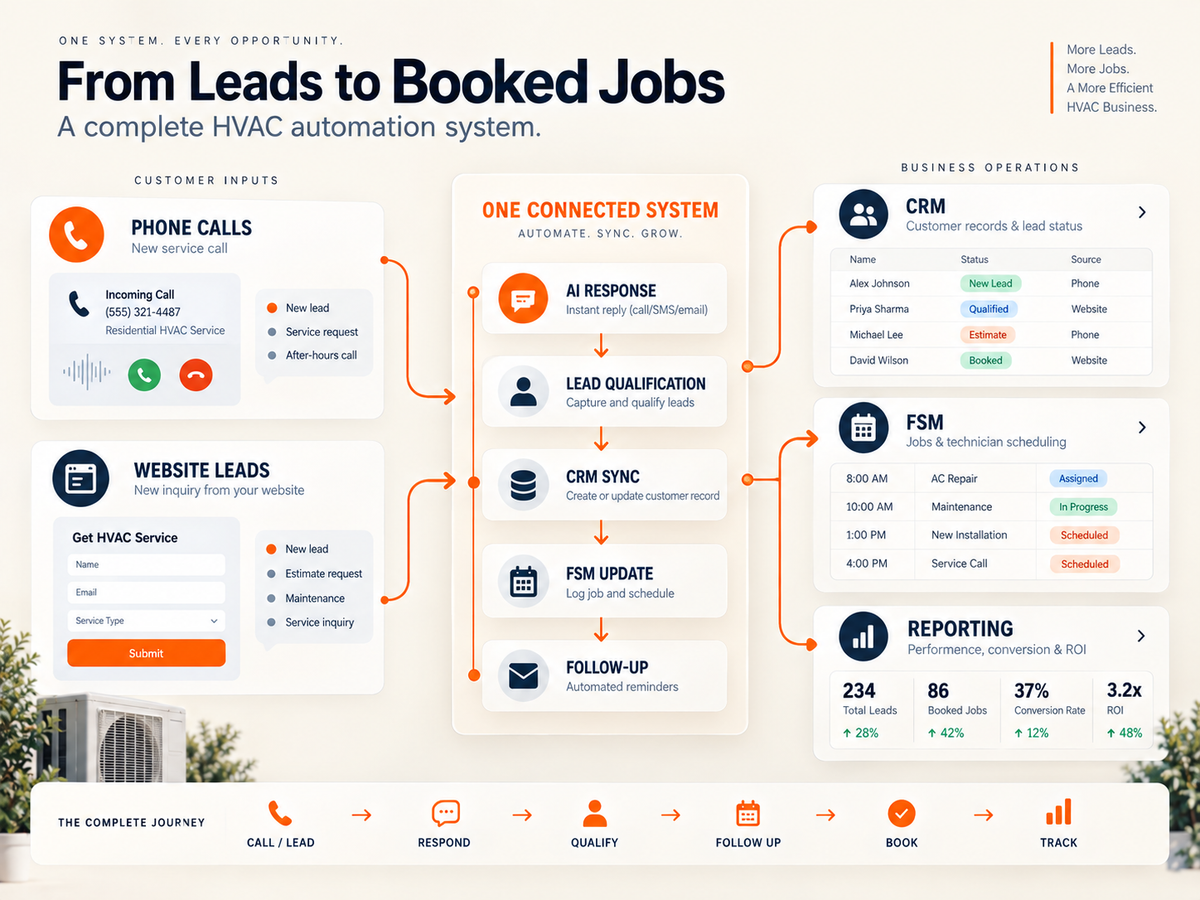
FatCamel AI is designed for contractors whose existing software handles the core operation, but whose team still spends time moving information between systems and following up manually.
An automation layer can connect the phone system, website, CRM, FSM, calendar, and follow-up process so information moves to the right place without requiring someone to copy it manually each time.
For an HVAC contractor, that might look like:
AI Voice Assistance Handle inbound or after-hours enquiries, collect job details, and route situations that need a person.
CRM Automation Create or update contacts, assign leads, move pipeline stages, and keep records synchronized.
Sales Automation Trigger follow-up after an enquiry or estimate, stop messages when a customer responds, and notify the appropriate employee.
Lead Reactivation Work through older CRM contacts and run approved campaigns for unsold estimates, maintenance opportunities, or past customers.
Marketing and Review Workflows Coordinate customer communication, review requests, and reporting after a completed job.
The point is not to remove people from the process.
Dispatchers, CSRs, and salespeople still need to handle exceptions, emergency decisions, pricing questions, technician judgment, and customers who need a real conversation.
Read More: Build an HVAC Lead Generation System That Works 24/7
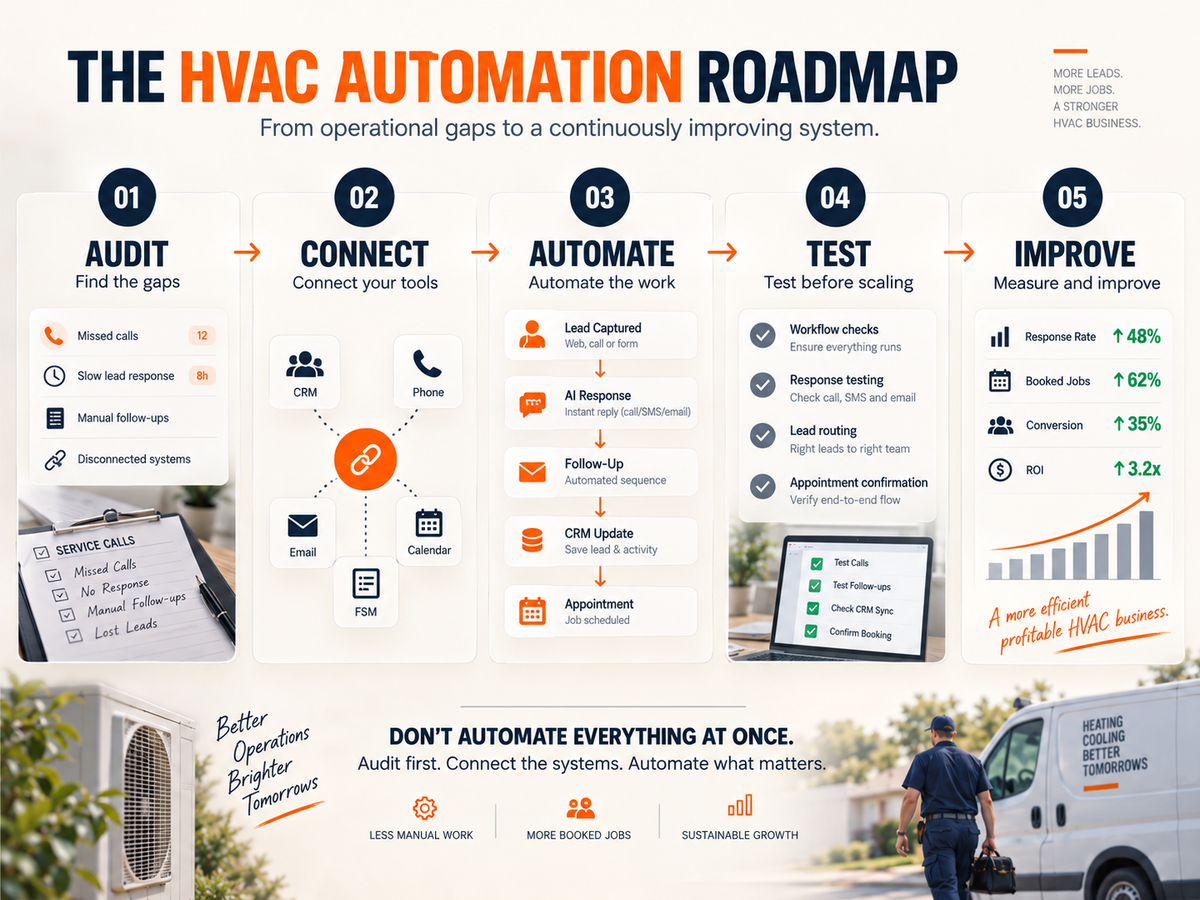
FatCamel’s Automation Process
Audit → Identify Gaps → Connect Systems → Build & Test → Launch → Optimize
The first two stages examine the FSM, CRM, lead flow, and handoffs and identify where automation can have the most practical impact.
FatCamel then connects the required tools, builds and tests the workflow, launches it, and improves the process based on usage and results.
Learn More About FatCamel
CRM Automation https://www.fatcamel.ai/services/crm-automation
Voice Assistant https://www.fatcamel.ai/services/voice-assistant
Business Automation https://www.fatcamel.ai/services/business-automation
FAQ
What is HVAC automation software?
HVAC automation software handles recurring work across an HVAC business, from scheduling and dispatch to quotes, invoices, call answering, estimate follow-up, CRM updates, and review requests.
The technology stack may include an FSM, separate AI tools, or both working together.
What is the best HVAC software for a small contractor?
Options such as Jobber and Housecall Pro are designed around the needs of smaller residential teams. The right choice depends on team size, plan limits, scheduling, payments, customer history, mobile use, integrations, and support.
The longest feature list is not necessarily the most important factor.
Do I need a separate AI tool if my FSM already has AI?
Not necessarily.
If the existing AI handles the company’s call, follow-up, and integration requirements, another tool may not be necessary.
A separate automation layer becomes more useful when the workflow crosses multiple systems or includes older leads and estimates that the native tools do not cover.
Will automation replace an HVAC dispatcher or CSR?
Automation can handle overflow, after-hours calls, record updates, and routine follow-up. Dispatchers and CSRs still make decisions around urgency, technician judgment, exceptions, pricing, and difficult customer situations.
How should an HVAC company measure software ROI?
Set a baseline before launching the automation.
Track metrics such as missed calls, response time, booked jobs, estimate conversion, reactivation revenue, and administrative hours. Compare those numbers with implementation and ongoing operating costs.
References
https://www.fatcamel.ai/ https://www.fatcamel.ai/services/business-
automation https://www.fatcamel.ai/services/crm-automation https://www.fatcamel.ai/services/voice-assistant https://www.fatcamel.ai/blog/how-to-add-ai-to-your-hvac-crm-without-replacing-it https://www.getjobber.com/pricing/ https://www.housecallpro.com/pricing/ https://www.servicetitan.com/blog/hvac-ai https://www.bdrco.com/blog/hvac-business-software-guide/https://www.fatcamel.ai/blog/recover-cold-hvac-leads-using-ai-and-turn-dead-contacts-into-booked-jobs/