

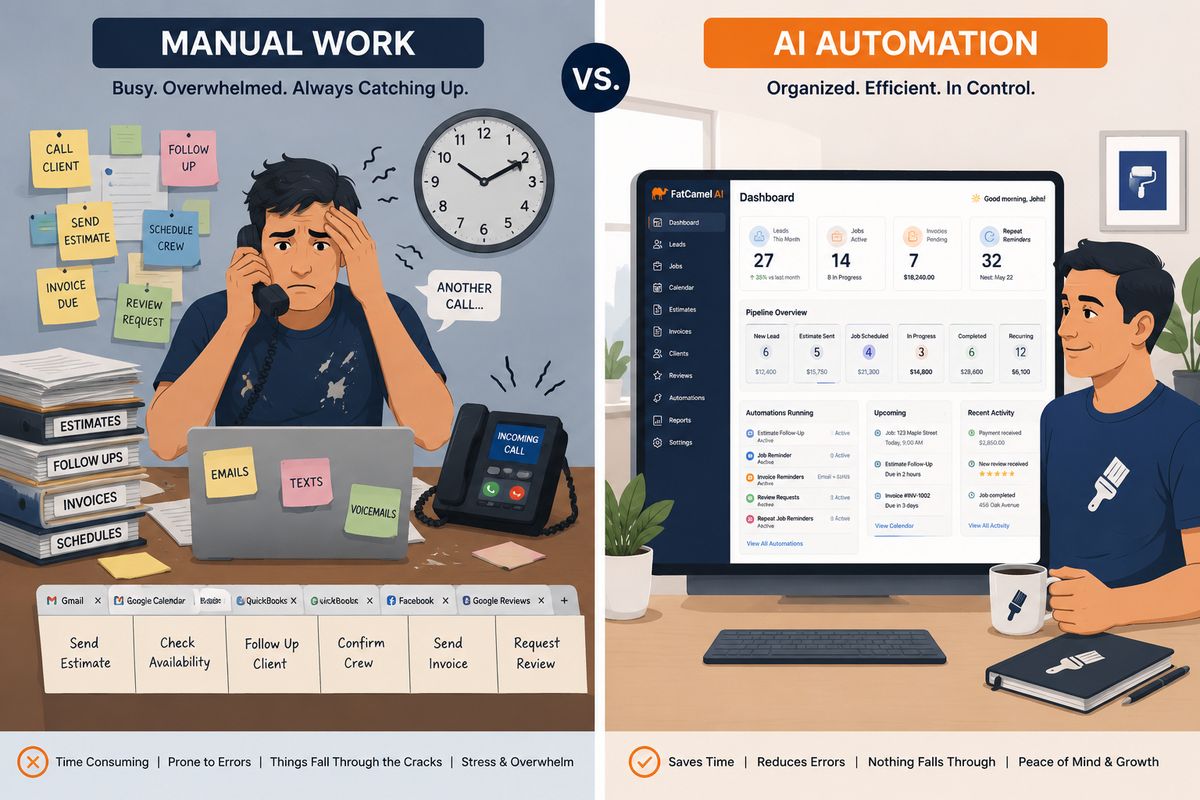
If you run a painting business, a significant portion of your day has nothing to do with painting. Answering the same questions over and over. Chasing leads that went quiet. Following up on unpaid invoices. Updating job statuses. Sending estimate reminders. Scheduling crews and notifying clients. Entering the same information into three different places.
This is manual work. And for most painting business owners, it consumes three to five hours every single day.
The frustrating part is that almost none of it requires human judgment. It is repetitive, rule-based, and predictable. Which means almost all of it can be handled by AI and workflow automation instead of by you or someone on your team.
This guide breaks down exactly where manual work is costing painting businesses the most time and money, and how AI eliminates it step by step. Not with vague promises about technology. With specific workflows, real examples, and a clear picture of what your business looks like when the manual bottlenecks are gone.
Table of Contents
The Real Cost of Manual Work in a Painting Business
Where Manual Work Hides in a Painting Business
AI vs Manual Work: What the Comparison Actually Looks Like
Eliminating Manual Work From Lead Management
Eliminating Manual Work From Estimating and Follow-Up
Eliminating Manual Work From Job Operations
Eliminating Manual Work From Invoicing and Payments
Eliminating Manual Work From Client Retention
How CRM Workflow Automation Ties It All Together
How FatCamel AI Eliminates Manual Work for Painting Businesses
FAQ
References
The Real Cost of Manual Work in a Painting Business
Manual work is not just inefficient. It is expensive. Every hour spent on admin tasks is an hour not spent on billable work, business development, or the things only you can do as a business owner.
Here is what manual work actually costs a painting business:
Lost revenue from slow lead response. When a lead comes in, and no one follows up within the first hour, the chance of converting that lead drops significantly. Manual follow-up is slow and inconsistent. Automated follow-up responds in seconds, every time.
Lost jobs from unconverted estimates. Most painting businesses send an estimate and then follow up once, maybe twice. After that, the lead is forgotten. An automated estimate follow-up sequence recovers a meaningful percentage of jobs that would otherwise go to a competitor who followed up more persistently.
Late payments from manual invoicing. When invoices are created and sent manually, they go out late, contain errors, and get chased inconsistently. Automated invoicing sends on time, follows up automatically, and gets paid faster.
Staff time on low-value tasks. Every hour a team member spends entering data, sending routine emails, or manually updating a spreadsheet is an hour that could be spent on something that actually grows the business.
Errors from manual data entry. When information is entered manually across multiple systems, mistakes happen. Wrong job addresses, incorrect pricing, missed follow-up dates. Automated workflows eliminate the human error that comes from repetitive manual tasks.
The total cost of manual work across a typical painting business is not just lost time. It is lost revenue, lost clients, and a ceiling on how much the business can grow without adding headcount proportionally.
Read More: How to Automate Your Painting Business (Step-by-Step System)
Where Manual Work Hides in a Painting Business
Before you can eliminate manual work, you need to know exactly where it lives. Most painting business owners are so accustomed to doing things manually that they do not even recognize it as a problem anymore. It is just how things get done.
Here are the most common places manual work hides in a painting business:
Lead management: Manually entering leads from different sources into a spreadsheet or CRM. Remembering to follow up. Sending individual responses to each inquiry by hand.
Estimating: Manually formatting and sending estimate documents. Following up on unsent estimates by phone or email. Chasing clients for a decision.
Job scheduling: Manually calling or texting crew members with job details. Confirming start dates with clients over the phone. Updating the schedule when jobs shift.
Invoicing: Manually creating invoices after each job. Sending payment reminders by hand. Tracking which invoices have been paid in a spreadsheet.
Client communication: Individually sending job confirmation messages, progress updates, and completion notices to clients.
Review requests: Remembering to ask happy clients for reviews. Sending the request manually weeks after the job, when the moment has passed.
Repeat job outreach: Relying on memory or luck to follow up with past clients when their paint is due for a refresh.
Reporting: Manually pulling numbers from different systems to understand how the business is performing.
Every single one of these is a workflow that can be automated. And every single one is a drain on your business until it is.
AI vs Manual Work: What the Comparison Actually Looks Like
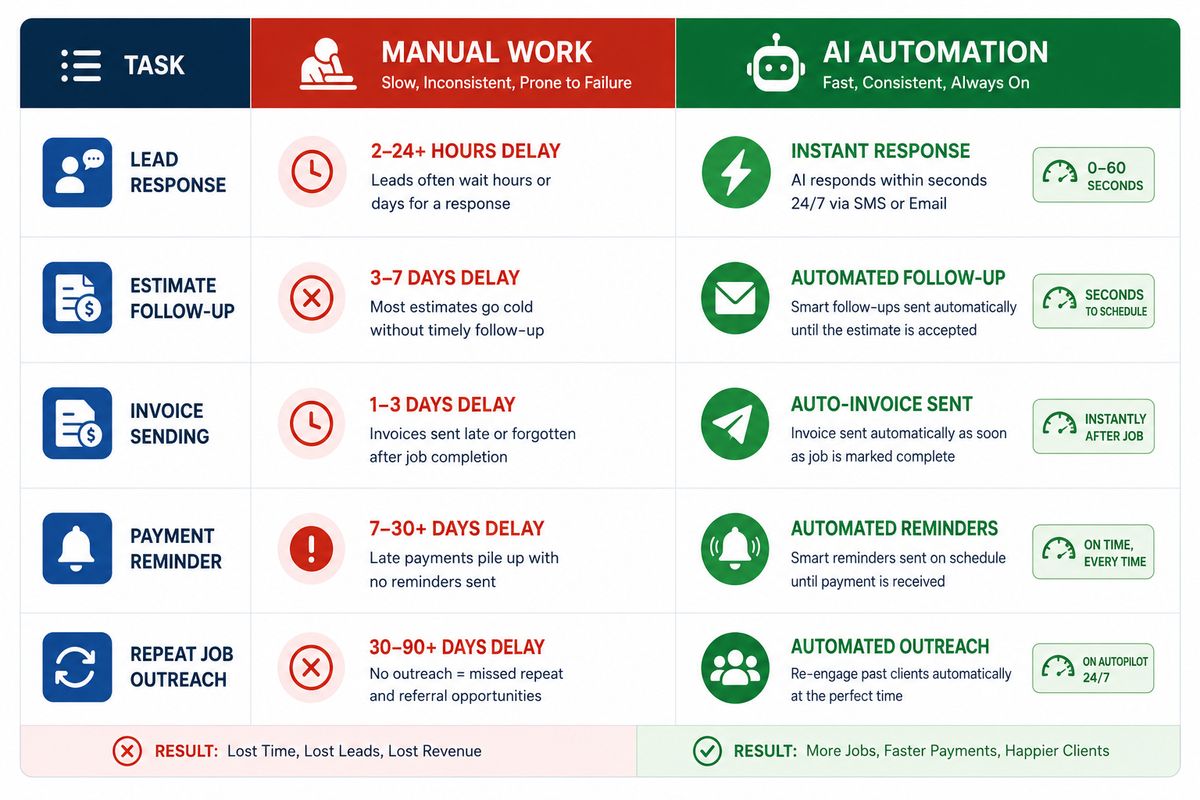
It is one thing to say that AI is faster than manual work. It is more useful to show exactly what that difference looks like in practice for a painting business.
Lead response: Manual: A lead comes in through the website at 7 pm. Someone sees it the next morning and sends a reply by 9 am. Fourteen hours have passed. AI: A lead comes in at 7 pm. An automated response goes out at 7:00 pm. A follow-up sequence starts at 7:01 pm. The lead has already heard from the business before any competitor responds.
Estimate follow-up: Manual: An estimate goes out on Monday. The salesperson means to follow up on Thursday, but gets busy on a job site. The follow-up happens the following Tuesday, nine days later. The client has already hired someone else. AI: An estimate goes out on Monday. An automated follow-up goes out on Thursday. Another on Monday. A final one on the following Thursday. Every touchpoint happens on schedule, regardless of what else is happening in the business.
Invoice payment: Manual: A job is completed on Friday. The invoice is created on Monday when the office manager gets around to it. It goes out on Tuesday. The payment reminder is sent two weeks later when someone notices it is overdue. AI: A job is marked complete on Friday at 4 pm. The invoice is generated and sent at 4:01 pm. A payment reminder goes out automatically on day three if unpaid. A second reminder on day seven. An escalation notification to the accounts team on day fourteen.
Past client outreach: Manual: A client had their building painted two years ago. No one remembers. The client hires a competitor for the refresh because no one reached out. AI: Two years after the job completion date, an automated repaint reminder goes out to the client referencing the original job. The client books a site visit. The job is won without any prospecting effort.
These are not edge cases. They are the daily reality of the difference between a manual painting business and an automated one.
Eliminating Manual Work From Lead Management
Lead management is where most painting businesses lose the most revenue to manual processes. Leads come in from multiple sources, get handled inconsistently, and a significant percentage fall through the cracks before anyone properly follows up.
Here is how AI eliminates manual work from lead management entirely:
Automatic lead capture from all sources. Website forms, Google ads, Facebook ads, and phone calls all feed into a single CRM automatically. No manual data entry. No leads sitting in an email inbox waiting to be transferred somewhere.
Instant automated response. Every new lead receives an automatic response within seconds of making contact. The message is personalized with their name and references the specific service they enquired about.
Automated qualification sequence. Instead of a salesperson manually calling every lead to qualify them, an automated sequence asks qualification questions via SMS or email. Responses are logged in the CRM and used to prioritize leads automatically.
Lead scoring and routing. The CRM automatically scores leads based on property type, job size, timeline, and budget, and routes high-priority leads to the sales team immediately for personal follow-up while lower-priority leads continue through the automated sequence.
The result is a lead management system that never sleeps, never forgets, and never lets a lead go cold because someone got busy.
Eliminating Manual Work From Estimating and Follow-Up
The estimating process is one of the most time-intensive parts of running a painting business. And the follow-up on sent estimates is one of the most consistently neglected.
Automated booking for site visits. When a lead confirms interest in a quote, an automated booking link goes out. The prospect picks a time, the appointment is confirmed, and a reminder goes to both the estimator and the client without a single phone call.
Estimate generation and delivery. Once the site visit is complete and the estimator inputs the job details, a branded estimate is generated and sent to the client automatically with a digital acceptance link.
Automated estimate follow-up. A sequence runs over the following two weeks if the estimate is not accepted. Day three, day seven, day fourteen. Each message is different, adding value or addressing a common objection rather than just asking for a decision.
Accepted estimate triggers. The moment a client accepts, the system automatically moves the job forward: deposit invoice sent, scheduling team notified, client confirmation dispatched. Everything that would normally require three manual steps from two different people happens in seconds.
Eliminating Manual Work From Job Operations
Running multiple painting jobs simultaneously is a coordination challenge. Crew assignments, client communications, material orders, progress updates. Done manually, it requires constant oversight. Done with automation, most of it runs without intervention.
Automatic job record creation. When a deposit is received, a job record is created automatically in the scheduling system with all details from the estimate. No manual re-entry of information that is already in the system.
Crew notification automation. Assigned crew members receive automatic job notifications with address, start time, scope of work, and client contact details. When jobs are rescheduled, updated notifications go out automatically.
Client communication automation. Clients receive automatic confirmation of their start date, a 48-hour reminder before work begins, and progress updates at key milestones for longer commercial jobs. None of these messages requires anyone to draft or send them manually.
Job completion triggers. When a job is marked complete, the system automatically initiates the post-job workflow: final invoice generation, client satisfaction message, review request, and maintenance offer sequence.
Read More: How Painting Businesses Can Grow Faster Using AI in 2026 Without Changing Their CRM
Eliminating Manual Work From Invoicing and Payments
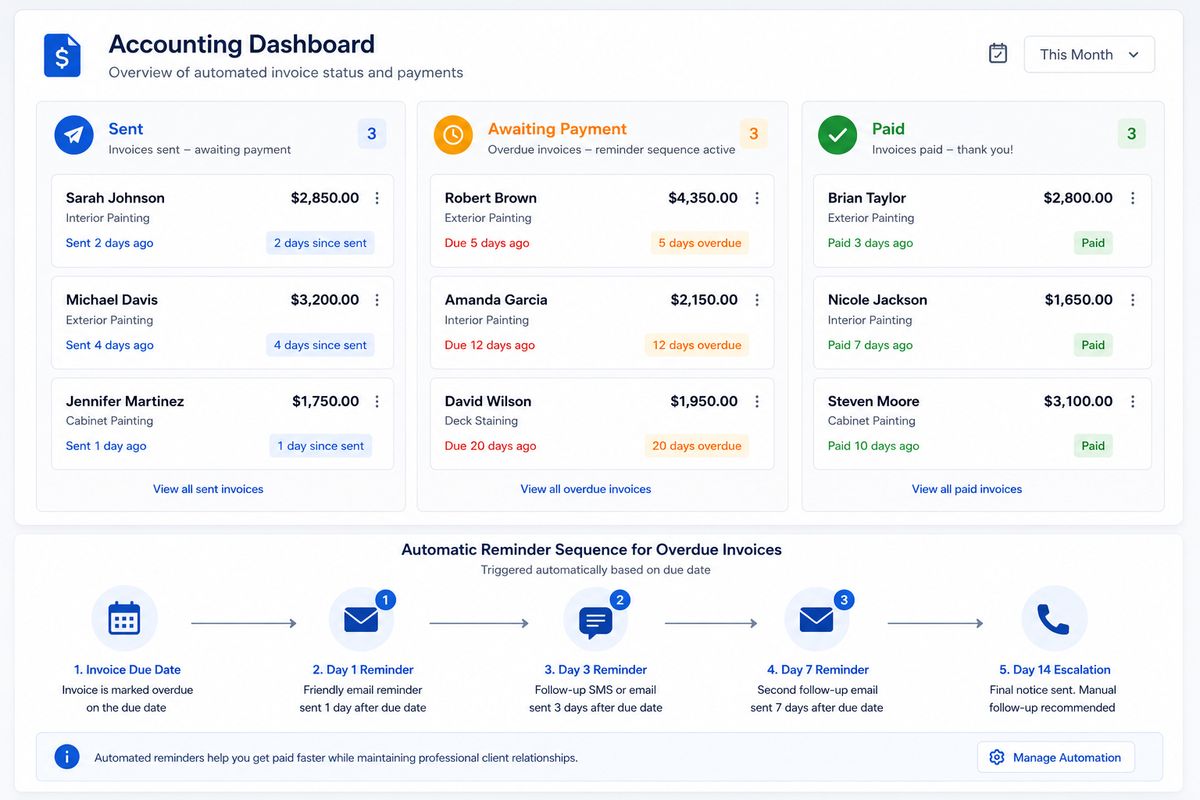
Cash flow is the lifeblood of a painting business. Manual invoicing slows it down at every stage. Invoices go out late, payment reminders are inconsistent, and chasing overdue accounts takes time that no one has.
Automated invoice generation. Deposit invoices, progress invoices, and final invoices are generated automatically at the right stage of each job. No one needs to open an accounting tool and create a document from scratch.
Automatic payment reminders. Unpaid invoices trigger a reminder sequence automatically. Polite at first, firmer as time passes, escalated to the accounts team when necessary. The sequence runs without anyone monitoring it.
Payment confirmation workflows. When payment is received, the system automatically updates the job record, sends a receipt to the client, notifies the relevant team members, and triggers whatever comes next in the workflow.
Reporting without spreadsheets. Revenue by month, outstanding invoices, average payment time, jobs by status. All of this is calculated and displayed automatically in a live dashboard. No manual reporting. No end-of-month spreadsheet assembly.
Eliminating Manual Work From Client Retention
The most neglected area of manual work in painting businesses is everything that happens after the job is done. Most businesses put all their energy into winning the job and then go silent. The client relationship fades. When they need painting again, they start from scratch with a new search.
Automated post-job follow-up. A satisfaction check and thank you message go out automatically within 24 hours of job completion. No one needs to remember to send it.
Review request automation. A review request with a direct link to your Google Business profile goes out two to three days after completion, when satisfaction is highest, and the experience is fresh.
Maintenance package offer. An automated offer for a maintenance package goes out as part of the post-job sequence, timed to land while the client relationship is at its strongest.
Repaint cycle reminders. The system calculates the expected repaint date based on surface type and coating, and triggers an automated reminder sequence when that date approaches. Past clients hear from you at exactly the right moment without anyone on your team tracking it manually.
Lapsed client reactivation. Clients who have not engaged in over twelve months enter an automatic reactivation sequence. A friendly, low-pressure message that reopens the conversation and brings dormant relationships back to life.
Read More: AI Marketing Automation for Roofing Companies
How CRM Workflow Automation Ties It All Together
Individual automations save time. A connected CRM workflow automation system transforms how the entire business operates.
A CRM is not just a database of contacts. When it is properly configured with workflow automation, it becomes the operating system of your painting business. Every lead, job, invoice, and client interaction flows through it automatically. Data moves between stages without manual transfer. The right actions trigger at the right times without anyone setting reminders.
Here is what CRM workflow automation looks like in a fully connected painting business:
A lead comes in. The CRM creates the record, triggers the follow-up sequence, and scores the lead based on the information provided. When the lead converts to an estimate, the CRM moves the record to the estimating stage and schedules the site visit. When the estimate is accepted, the CRM creates the job, sends the deposit invoice, and notifies the scheduling team. When the job is complete, the CRM triggers the post-job sequence, generates the final invoice, and schedules the repaint reminder for the future.
Every stage flows into the next automatically. No manual handoffs. No information is lost between steps. No leads, jobs, or clients that fall through because someone forgot to update a record.
This is the difference between using a CRM as a digital filing cabinet and using it as a fully automated business workflow system.
How FatCamel AI Eliminates Manual Work for Painting Businesses
Every automation described in this guide needs to be built, connected, and maintained. For painting business owners who are already stretched thin, building a full automation system from scratch using generic tools is not realistic.
FatCamel AI is built specifically to eliminate manual work in trade contractor businesses, with painting companies as a core use case. It is not a general-purpose tool that you configure from scratch. It is a system designed around how painting businesses actually operate.
Here is what FatCamel AI delivers:
Pre-built workflows for painting businesses. The lead follow-up sequences, estimate reminders, job notification templates, invoice workflows, post-job sequences, and repaint reminders are all pre-built for painting business use cases. You are not starting from a blank canvas.
Unified system, no tool-switching. FatCamel AI connects lead management, job operations, invoicing, client retention, and reporting in a single platform. Data flows between every stage automatically without integrations breaking or information being lost between systems.
AI personalization across every touchpoint. Every automated message is personalized using real client and job data. Property details, job history, coating used, and contact preferences. Clients receive messages that feel individual, even when they are fully automated.
Reporting that replaces manual tracking. Revenue, pipeline health, outstanding invoices, active sequences, and upcoming renewals. Every metric is live in the FatCamel AI dashboard without anyone pulling numbers from multiple sources.
Ongoing support is built for contractors. FatCamel AI is not a self-serve tool that leaves you to figure it out alone. The system is set up for your business specifically, with support from a team that understands the painting industry.
The result is a painting business where the manual work that was consuming your day is handled by the system, and your time is freed up for the work that actually moves the business forward.
👉 See how FatCamel AI eliminates manual work in your painting business
FAQ
1. What manual tasks can AI actually eliminate in a painting business?
AI can eliminate manual lead entry, lead follow-up, estimate delivery and follow-up, crew scheduling notifications, client confirmation messages, invoice generation, payment reminders, post-job review requests, maintenance package offers, and repaint cycle reminders. Essentially, any task that is repetitive, rule-based, and does not require human judgment can be automated.
2. How does CRM workflow automation work for painting contractors?
CRM workflow automation works by setting up rules that trigger automatic actions when certain conditions are met. When a lead is created, a follow-up sequence starts. When an estimate is accepted, an invoice is generated. When a job is complete, a review request goes out. The CRM manages the flow of data between every stage of the business automatically without manual intervention.
3. Is AI automation expensive for a small painting business?
The cost of AI automation tools is significantly lower than the cost of the manual work they replace. A painting business spending three to five hours per day on admin tasks at any reasonable hourly rate is losing far more to manual work than any automation platform costs. Most painting businesses that implement a full automation system see a positive ROI within the first 60 to 90 days.
4. How long does it take to eliminate manual work from a painting business using AI?
The timeline depends on which workflows are automated and in what order. Lead follow-up and estimate automation can be live within a week and produce results immediately. The full system, covering operations, invoicing, client retention, and repeat job outreach, typically takes two to four weeks to configure and launch. Results across all areas are measurable within the first 90 days.
5. Will automation replace the personal touch that clients expect from a painting contractor?
No. Done correctly, automation enhances the client experience rather than diminishing it. Clients receive faster responses, timely updates, and consistent communication that most painting businesses cannot deliver manually. The messages are personalized with real job and client data, so they feel individual. The personal touch comes from your team at the moments that matter, like the sales conversation and the on-site relationship. Automation handles the routine touchpoints, so your team has more time for the meaningful ones.
6. What is the difference between basic software automation and AI-powered automation for contractors?
Basic software automation follows fixed rules: send this email when this happens. AI-powered automation adapts: personalize this message based on the client profile, adjust timing based on engagement history, and prioritize this lead based on their responses. AI produces better results because it treats each client as an individual rather than applying the same fixed action to everyone.
7. How does FatCamel AI differ from other automation tools for painting businesses?
Most automation tools are built for general business use and require significant customization to work for a painting contractor. FatCamel AI is built specifically for trade contractors with painting businesses as a core use case. The workflows, message templates, pipeline stages, and reporting are all designed around how painting businesses operate and how their clients buy, which means faster setup and better results from day one.
References
https://www.salesforce.com/research
https://www.hubspot.com/marketing-statistics
https://hbr.org/2011/03/the-short-life-of-online-sales
https://www.mckinsey.com/capabilities/growth-marketing-and-sales/our-insights
https://www.forbes.com/business-council
https://www.campaignmonitor.com/resources/guides/email-marketing-benchmarks
https://www.paintcontractormag.com