

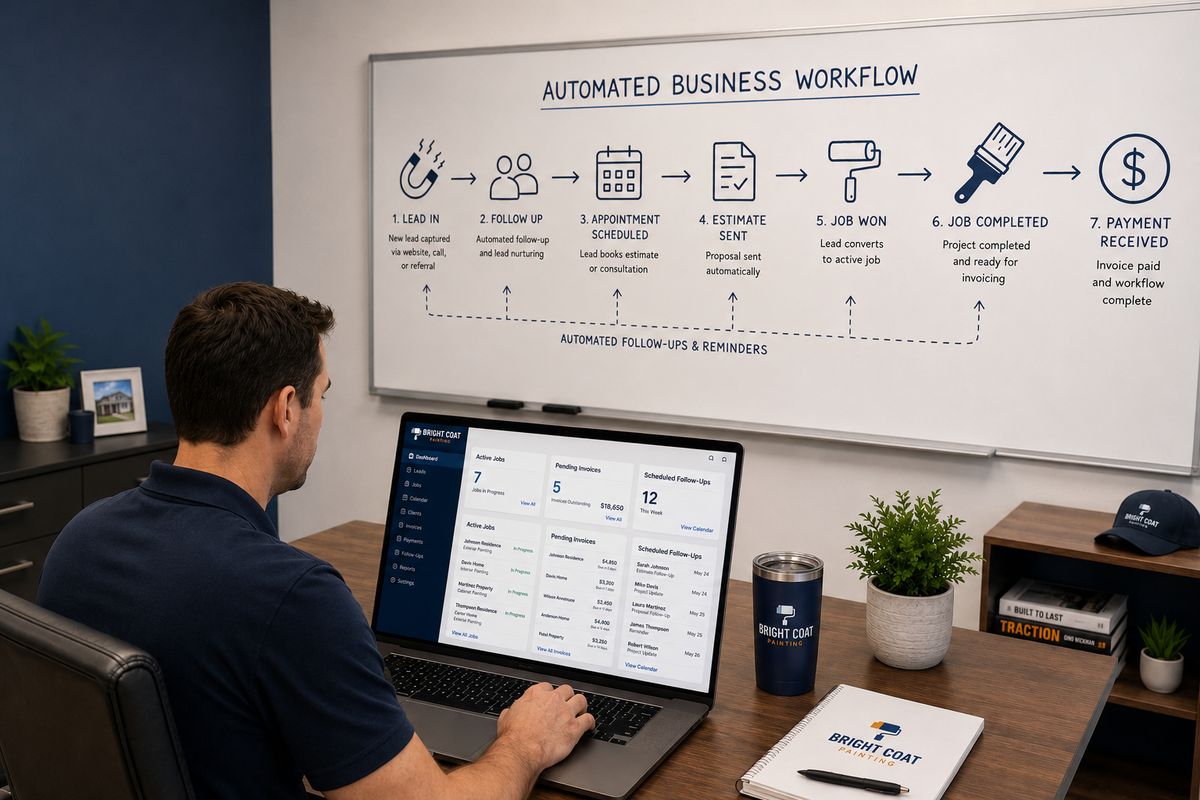
Running a painting business manually is exhausting. You are quoting jobs, chasing leads, coordinating crews, following up on invoices, scheduling the next project, and trying to find time to actually grow the business. Most painting business owners are working in the business every hour of the day instead of working on it.
The ones who break out of that cycle are not working harder. They have built systems that handle the repetitive, time-consuming work automatically. Lead follow-up runs without them. Invoices go out without them. Job reminders, client check-ins, crew notifications, renewal sequences. All of it runs in the background while they focus on the work that actually requires their attention.
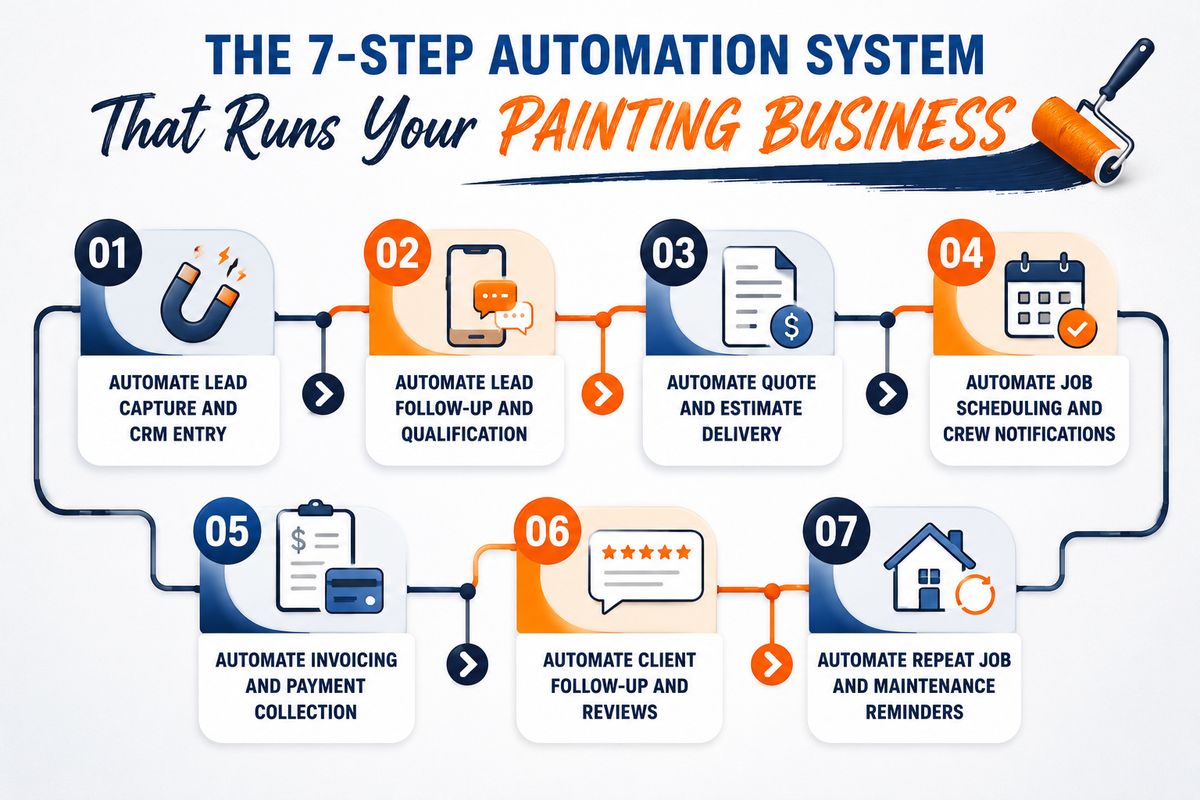
This guide is a step-by-step breakdown of how to automate a painting business from end to end. From the moment a lead comes in to the moment a past client books their next job, every stage of the business has an automation opportunity. By the time you finish reading, you will have a clear picture of what a fully automated painting business looks like and exactly how to build it.
Table of Contents
Why Automation Is No Longer Optional for Painting Contractors
Step 1: Automate Lead Capture and CRM Entry
Step 2: Automate Lead Follow-Up and Qualification
Step 3: Automate Quote and Estimate Delivery
Step 4: Automate Job Scheduling and Crew Notifications
Step 5: Automate Invoicing and Payment Collection
Step 6: Automate Client Follow-Up and Reviews
Step 7: Automate Repeat Job and Maintenance Reminders
How FatCamel AI Connects the Full System
What a Fully Automated Painting Business Looks Like
FAQ
References
Why Automation Is No Longer Optional for Painting Contractors
A few years ago, automation was something large companies with big budgets used. Today it is accessible to any painting business owner with a laptop and the right tools. The barrier is not cost or technical skill. It is knowing what to automate and in what order.
The painting businesses that are growing fastest in 2026 are not the ones with the most painters or the biggest marketing budgets. They are the ones who have removed the manual bottlenecks from their operation. Every hour your team spends on admin work, chasing payments, or manually following up with leads is an hour not spent on billable work or business development.
Automation does not replace your team. It removes the work that was slowing your team down. The result is a business that handles more volume, closes more jobs, and retains more clients without adding headcount proportionally.
The step-by-step system below covers every major automation opportunity in a painting business, in the order you should build them.
Read More: How Painting Companies Can Get More Commercial Clients From AI in 2026
Step 1: Automate Lead Capture and CRM Entry
Every automation in your business starts with the lead. If leads are coming in through your website, social media, phone calls, or referrals and being manually entered into a spreadsheet or forgotten entirely, the entire pipeline downstream suffers.
The first step is to make sure every lead that comes into your business is captured automatically and entered into your CRM without anyone on your team having to do it manually.
Here is how to set this up:
Website contact forms connect directly to your CRM. When a potential client fills out a quote request form, their name, contact details, property address, and job description are automatically created as a new lead record in your pipeline.
Facebook and Google ad leads sync directly to your CRM through integrations. Every lead form submission from a paid ad campaign creates a CRM entry instantly, with the source tagged so you know which campaign generated it.
Phone call leads are captured through a call tracking system that logs the caller's number, the time of the call, and a recording. If the caller does not book immediately, they are added to the CRM as a lead requiring follow-up.
Referral leads are entered through a simple intake form that your team fills out on mobile when a referral call comes in. One form, thirty seconds, and the lead is in the system.
The goal of this step is simple: no lead should ever exist only in someone's memory, inbox, or notebook. Every lead is in the CRM within minutes of first contact, tagged by source, and ready for the automated follow-up sequence to begin.
Step 2: Automate Lead Follow-Up and Qualification
A lead in your CRM is worth nothing if no one follows up. The painting businesses that win the most jobs are not necessarily the best painters. They are the ones who respond fastest and follow up most consistently.
Studies consistently show that responding to a lead within five minutes dramatically increases the chance of conversion compared to responding within an hour. Manual follow-up cannot reliably hit that window. Automated follow-up can hit it every single time.
Here is how the automated lead follow-up system works:
Immediate response: The moment a lead enters your CRM, an automatic SMS and email go out acknowledging the inquiry. Something simple: "Hi [Name], thanks for reaching out to [Your Business Name]. We received your request and will be in touch within [timeframe] to discuss your project." This alone sets you apart from competitors who take hours or days to respond.
Follow-up sequence: If the lead does not respond to the initial message or book a call, a sequence runs over the following days. Day 1, day 3, and day 7 touchpoints go out across email and SMS, each one adding a small piece of value or making the next step slightly easier.
Qualification questions: Automated messages can include simple qualification questions to help your team prioritize leads. Property type, approximate square footage, timeline, and budget range. Leads who respond with commercial properties and near-term timelines get flagged as high priority and escalated to the sales team immediately.
Unresponsive leads: Leads that do not respond after the full initial sequence enter a longer-term nurture sequence that sends light-touch messages monthly. Many painting jobs are planned months in advance. A lead that goes cold in February may be ready to book in May.
Step 3: Automate Quote and Estimate Delivery
Quoting is one of the biggest time sinks in a painting business. Site visits, measurements, material calculations, pricing, formatting, and sending. For commercial jobs, especially, the quoting process can take hours per estimate, and a significant percentage of those estimates never convert.
Automation does not replace the quoting process entirely, but it removes the manual steps around it that slow everything down.
Automated quote request scheduling: When a lead confirms interest in a quote, an automated booking link goes out that lets them schedule a site visit directly on your estimator's calendar. No back-and-forth phone calls to find a time. One link, one click, booked.
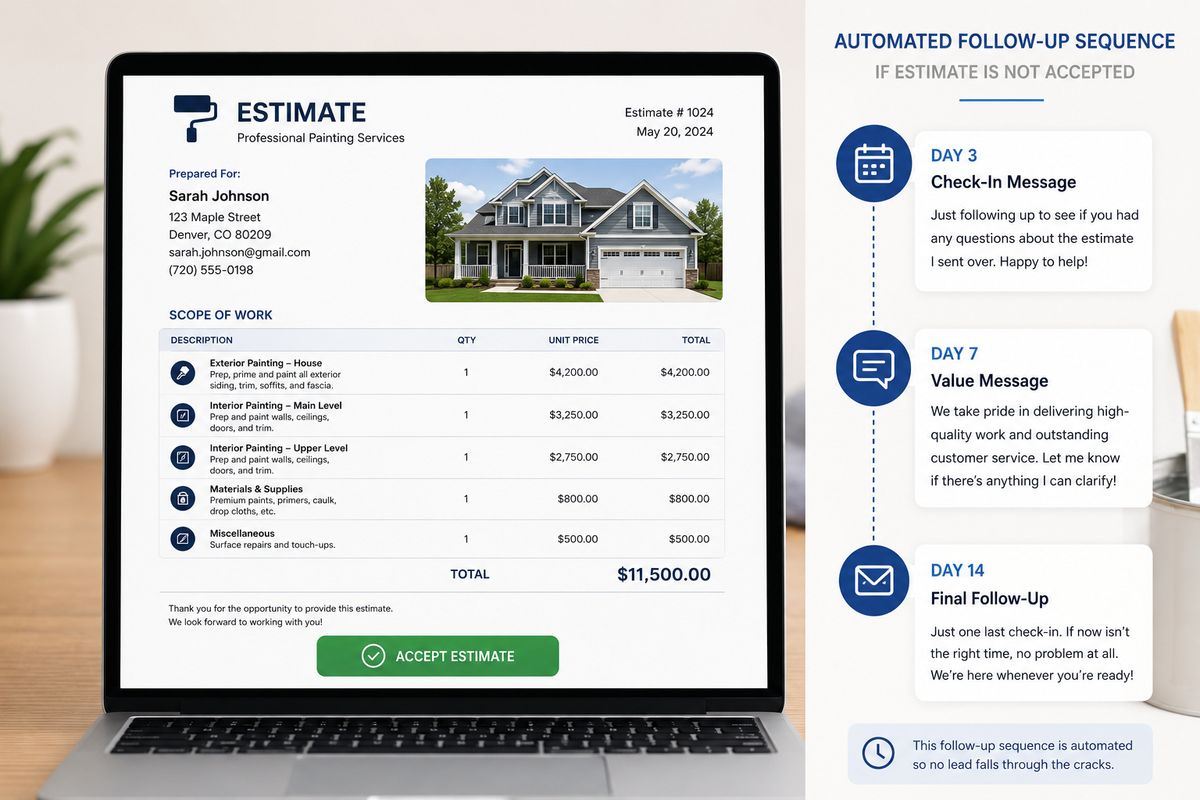
Estimate delivery automation: Once the estimator completes the site visit and inputs the job details, the system generates a branded, itemized estimate and sends it to the client automatically via email with a digital acceptance link. No manually formatting documents. No printing and scanning.
Estimate follow-up sequence: After the estimate is sent, an automated sequence follows up if the client has not responded. Day 3: a friendly check-in asking if they have any questions. Day 7: a message that adds a small piece of value, such as a note about the best season for exterior painting or a case study from a similar property. Day 14: a final follow-up that keeps the door open without pressure.
Accepted estimate triggers: The moment a client clicks accept on the estimate, the system automatically moves them to the next pipeline stage, sends a deposit invoice, notifies the scheduling team, and triggers the job setup workflow. No manual handoff required.
This single automation recovers a significant amount of revenue that would otherwise be lost to slow follow-up on unconverted estimates.
Read More: How to Increase Conversion Rate for Painting Leads Using AI
Step 4: Automate Job Scheduling and Crew Notifications
Once a job is confirmed, the operational side of the business kicks in. Scheduling crews, ordering materials, communicating job details, and confirming start dates with clients. Done manually, this is a coordination nightmare, especially when multiple jobs are running simultaneously.
Automation brings order to the operational side of a painting business.
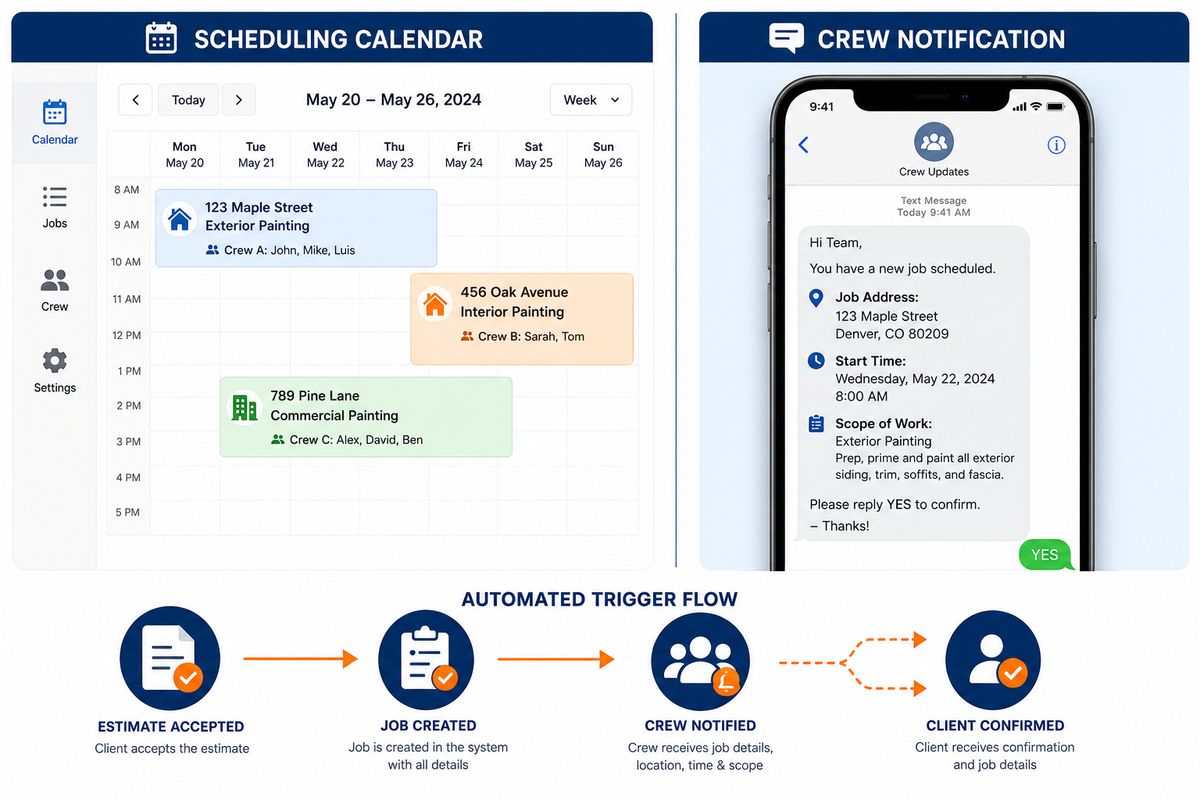
Automated job creation: When an estimate is accepted and a deposit is received, a job record is automatically created in your scheduling system with all relevant details: client name, property address, scope of work, start date, assigned crew, and materials required.
Crew notifications: The assigned crew receives an automatic notification with full job details as soon as they are scheduled. Job address, start time, scope of work, any access instructions, and the client contact details. No phone calls from the office to relay information that is already in the system.
Client confirmation messages: The client receives an automatic confirmation of their scheduled start date and a reminder 48 hours before the job begins. The reminder includes who to expect on site, what time they will arrive, and a contact number for the project lead.
Material ordering triggers: For painting businesses that manage their own materials, the job creation can trigger an automatic purchase order or materials checklist sent to the procurement team or supplier.
Progress updates: For longer commercial jobs, automated progress update messages can go out to the client at set intervals, keeping them informed without requiring your project manager to draft individual updates.
Step 5: Automate Invoicing and Payment Collection
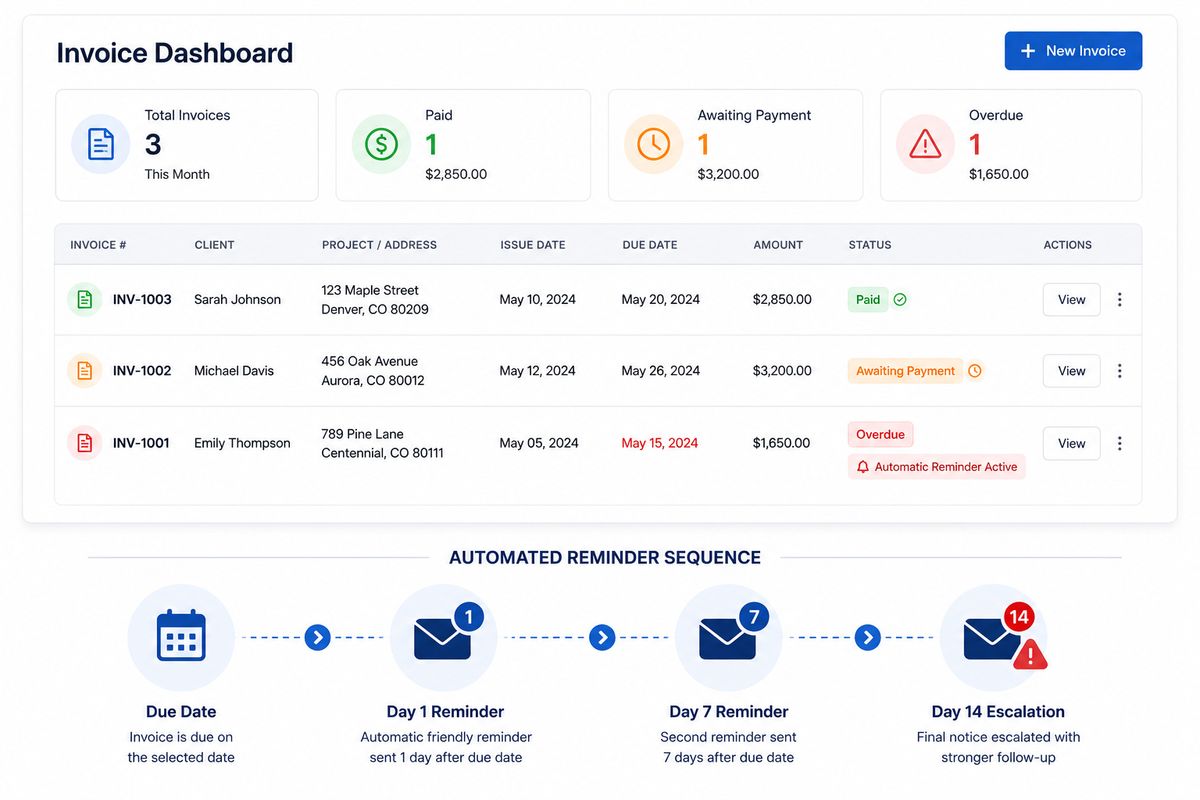
Late payments and manual invoicing are two of the most common cash flow problems in painting businesses. Chasing payments takes time, creates awkward client interactions, and delays the revenue your business has already earned.
Automated invoicing and payment collection remove all of that friction.
Deposit invoice automation: When a job is confirmed, a deposit invoice is generated and sent automatically with a payment link. The client can pay instantly by card or bank transfer. The payment is logged in your accounting system without manual entry.
Progress invoicing for larger jobs: For commercial jobs that run over multiple weeks, milestone invoices are generated and sent automatically when each phase of work is completed. Your project manager marks the phase complete, and the invoice goes out within minutes.
Final invoice automation: When a job is marked complete, the final invoice is generated automatically based on the confirmed scope of work and sent to the client with a payment link.
Payment reminder sequences: If an invoice is not paid within the due date, an automatic reminder sequence runs. A polite reminder at day one past due. A slightly firmer reminder at day seven. A notification to your accounts team on day fourteen to escalate if needed.
Payment confirmation triggers: When payment is received, the system automatically sends a receipt to the client, updates the job record in the CRM, notifies the accounts team, and triggers any post-job workflows like the client review request or maintenance package offer.
Step 6: Automate Client Follow-Up and Reviews
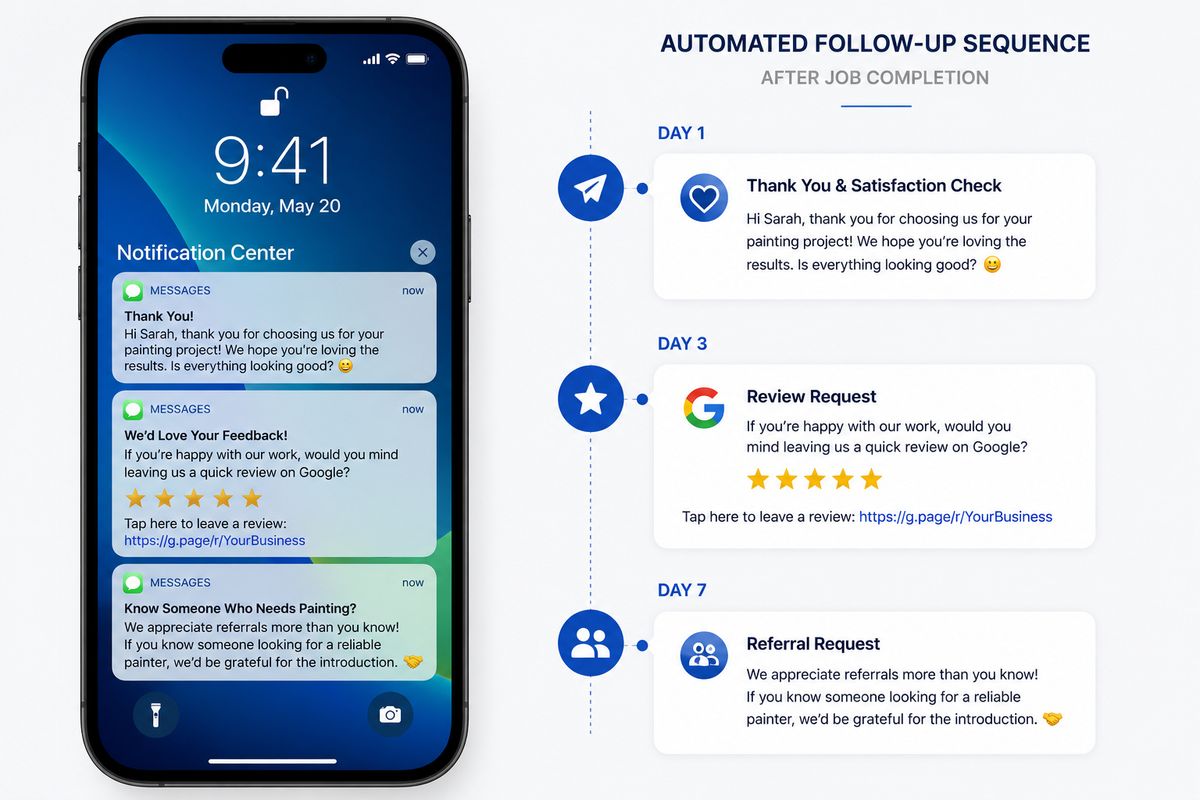
The period immediately after a job is completed is one of the most valuable moments in the client relationship. The work is fresh, the client is happy, and they are most likely to leave a review, refer a friend, or consider a maintenance package.
Most painting businesses miss this window because there is no system to capture it.
Job completion follow-up: When a job is marked complete, an automatic message goes out to the client thanking them for their business and confirming the work is done. It asks if everything met their expectations and provides a direct contact for any concerns.
Review request automation: Two to three days after job completion, an automated review request goes out with direct links to your Google Business profile and any other review platforms you use. The message is short, warm, and makes leaving a review as easy as one click.
Referral request: One week after the job, a light-touch message goes out asking if they know anyone else who might benefit from your services. A simple referral ask at the right moment, when satisfaction is highest, consistently generates new leads at zero acquisition cost.
Maintenance package offer: As covered in the recurring revenue system, the post-job period is also the best time to introduce a maintenance package. The automated offer goes out as part of the post-job sequence, timed to land when the client is most engaged.
Step 7: Automate Repeat Job and Maintenance Reminders
The final piece of the automation system is the one with the longest time horizon and the highest lifetime value impact. Past clients are your warmest leads. A system that keeps them engaged between jobs turns a one-time customer into a long-term account.
Repaint cycle reminders: Based on the surface type and coating used, the system calculates when each property is likely to need repainting and triggers an automated reminder sequence at the right time. The message references the original job and positions your business as the natural choice for the next one.
Seasonal outreach: Automated seasonal messages go out at the start of spring and autumn, the peak planning periods for painting projects. These messages are not hard pitches. They are helpful reminders about the best conditions for exterior painting and an invitation to book an assessment.
Annual maintenance check-ins: Clients on maintenance packages receive automated annual check-in messages with a summary of work completed and a renewal prompt. Clients not on maintenance packages receive a lighter annual touchpoint, keeping the relationship warm.
Lapsed client reactivation: Clients who have not engaged with the business in over twelve months enter an automatic reactivation sequence. A short, friendly message that acknowledges the time, references the original work, and opens the door to the next conversation.
Together, these automations ensure that no past client is ever forgotten and that your painting business is always the first name that comes to mind when a past client is ready to repaint.
Read More: Why Fast Response Wins Painting Jobs (And How to Automate It in 2026)
How FatCamel AI Connects the Full System
Each of the seven steps above is a powerful automation on its own. But the real impact comes when they are all connected into a single, coordinated system where data flows between every stage automatically, and nothing falls between the cracks.
FatCamel AI is built to run the complete painting business automation system, from the first lead through to the long-term client relationship, in one unified platform designed specifically for trade contractors.
Here is what FatCamel AI manages across the full system:
Unified data flow. Every lead, job, invoice, and client interaction is connected in a single system. When a lead converts to a job, the data moves automatically. When a job is completed, the post-job workflows trigger automatically. Nothing needs to be manually transferred between tools.
AI-powered personalization. Every automated message, from the initial lead response to the annual repaint reminder, is personalized using real data from the client record. Property details, job history, contact preferences. The messages feel individual because they are built from real information.
Multi-channel coordination. FatCamel AI manages email, SMS, and internal notifications as a coordinated system. The right channel is used at the right stage based on what has worked for each client previously.
Full pipeline visibility. A single FatCamel AI dashboard shows the health of the entire business: active leads, jobs in progress, outstanding invoices, upcoming renewals, and past clients in follow-up sequences. Every number is live and accurate without anyone updating a spreadsheet.
Hands-off operation. Once FatCamel AI is configured for your painting business, the system runs daily without management. Your team receives the notifications they need, the clients receive the messages they need, and the business moves forward without anyone manually coordinating any of it.
FatCamel AI is not a collection of disconnected tools. It is a single system built around how painting businesses operate. Hence, the automation works the way your business actually works rather than requiring your business to adapt to the tool.
👉 See how FatCamel AI automates your painting business
What a Fully Automated Painting Business Looks Like
When all seven steps are running together, the day-to-day experience of running a painting business changes fundamentally.
A lead comes in at 9 pm on a Sunday. By 9:01 pm, the lead has received an automatic response, been entered into the CRM, and the follow-up sequence has started. Your team does not know about it until Monday morning, when they see a qualified lead already in the pipeline with two days of follow-up already completed.
A commercial client accepts an estimate on a Tuesday afternoon. By Tuesday evening, the deposit invoice has been sent, the crew has been notified of the job details, and the client has received a confirmation of their start date. Your office manager did not make a single phone call.
A job is marked complete on a Friday. By Friday afternoon, the final invoice is on its way, the client has received a thank you message, and the Google review request is scheduled for Sunday morning. The maintenance package offer goes out on the following Wednesday. The repaint reminder is already scheduled for three years from today.
This is what a fully automated painting business looks like. Not a business where technology has replaced your team. A business where your team spends their time on work that matters, and the system handles everything else.
FAQ
1. What does it mean to automate a service business like a painting company?
Automating a service business means using software and AI tools to handle repetitive, time-consuming tasks automatically without manual effort from your team. For a painting business, this includes lead follow-up, quote delivery, job scheduling, crew notifications, invoicing, payment reminders, client reviews, and repeat job outreach. The goal is to remove manual bottlenecks, so your team can focus on billable work and growth.
2. What are the most important workflows to automate first in a painting business?
The highest-impact automations to build first are lead follow-up and estimate follow-up. These two workflows directly affect revenue and are the areas where most painting businesses lose the most opportunities. After those are running, invoicing and payment collection automation saves significant time and improves cash flow. The repeat job and maintenance reminder system builds long-term value but takes longer to show results.
3. Do you need technical skills to automate a painting business?
No. Modern business automation tools, particularly those built specifically for trade contractors like FatCamel AI, are designed to be set up and managed without coding or technical expertise. The configuration involves defining your workflows, writing your message sequences, and connecting your existing tools. Most painting businesses can have a basic automation system live within one to two weeks.
4. How much time does business automation save for a painting contractor?
The time savings vary by business size and which workflows are automated, but painting businesses that implement a full automation system typically recover five to fifteen hours of admin time per week. For a small business, that is the equivalent of a part-time admin role. That time can be redirected to sales, operations, or simply removed from the owner's workload.
5. Can workflow automation work for both residential and commercial painting businesses?
Yes. The core automation workflows apply to both segments. The messaging, timing, and pipeline stages differ between residential and commercial, but the underlying system is the same. A well-configured automation platform lets you run separate workflows for each segment simultaneously, so each type of client gets the experience that matches how they buy.
6. How does AI improve business automation for painting contractors compared to basic software?
Basic software automates fixed actions: send this email at this time. AI adds intelligence to the automation: personalize this message based on the client's property type, adjust the follow-up timing based on engagement history, and flag this lead as high priority based on their responses. AI-powered automation produces better results because it adapts to each client rather than treating everyone identically.
7. What is the ROI of automating a painting business?
The ROI of business automation for a painting company comes from multiple directions: more leads converted because follow-up is faster and more consistent, more estimates closed because the follow-up sequence catches clients who would otherwise go cold, better cash flow because invoices go out and reminders run automatically, and more repeat business because past clients are systematically re-engaged. Most painting businesses that implement a full automation system see a measurable revenue impact within the first 90 days.
References
https://www.salesforce.com/research
https://www.hubspot.com/marketing-statistics
https://hbr.org/2011/03/the-short-life-of-online-sales
https://www.mckinsey.com/capabilities/growth-marketing-and-sales/our-insights
https://www.forbes.com/business-council
https://www.campaignmonitor.com/resources/guides/email-marketing-benchmarks
https://www.paintcontractormag.com