

If you run a renovation business, a significant portion of your working day has nothing to do with renovation. Responding to the same questions from new leads. Chasing estimates that went quiet. Creating invoices one by one. Sending update emails to clients who are wondering what is happening on their project. Following up on overdue payments. Entering the same information into multiple systems that do not talk to each other.
This is manual work. And for most renovation business owners, it takes three to five hours each working day.
The frustrating part is that almost none of it requires human judgment. It is repetitive, rule-based work that follows predictable patterns. Which means almost all of it can be handled by AI and workflow automation instead of by you or someone on your team.
This guide breaks down exactly where manual work is costing renovation businesses the most time and money, and how AI eliminates it step by step. Not in theory. With specific workflows, real examples, and a clear picture of what the business looks like when the manual bottlenecks are removed.
Table of Contents
The Real Cost of Manual Work in a Renovation Business
Where Manual Work Hides in a Renovation Business
Manual vs AI: What the Difference Actually Looks Like
Eliminating Manual Work From Lead Management
Eliminating Manual Work From Estimating
Eliminating Manual Work From Job Operations
Eliminating Manual Work From Invoicing and Payments
Eliminating Manual Work From Client Retention
How CRM Workflow Automation Ties It Together
How FatCamel AI Eliminates Manual Work for Renovation Businesses
FAQ
References
The Real Cost of Manual Work in a Renovation Business
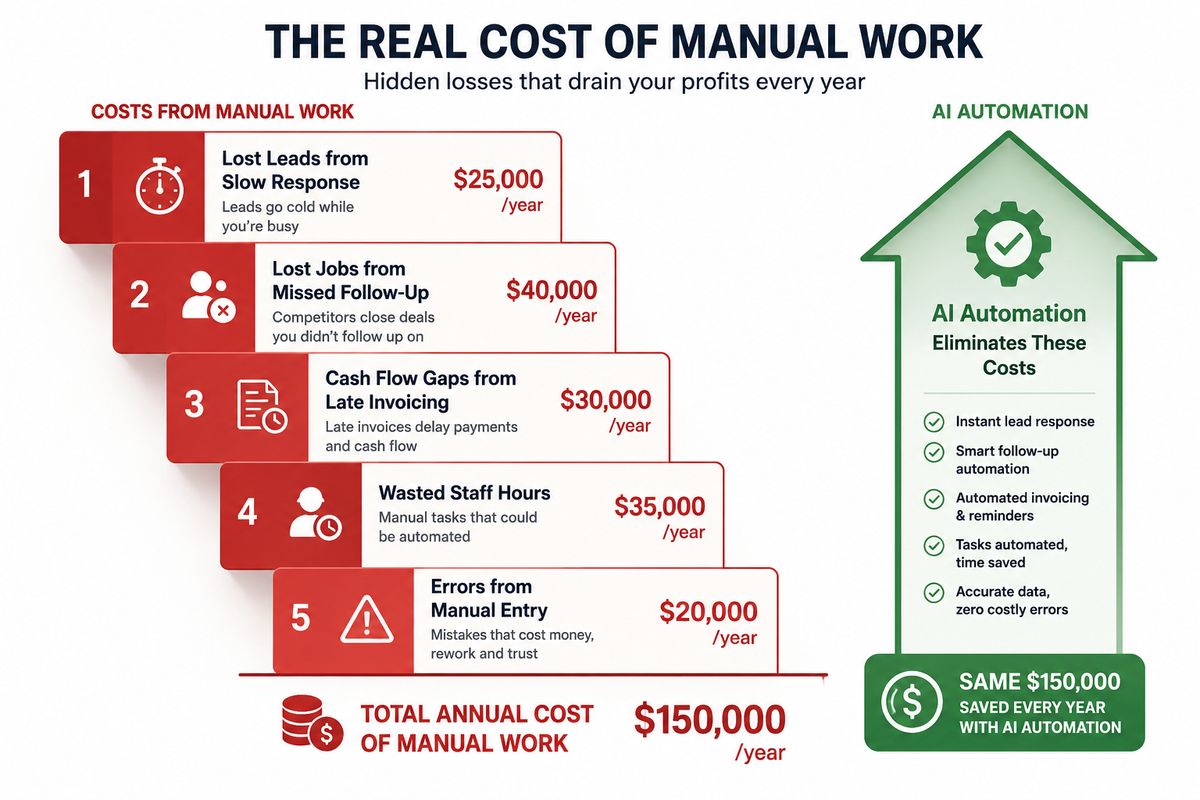
Manual work is not just inefficient. It is expensive in ways that do not always show up clearly on a financial report but accumulate significantly over time.
Lost revenue from slow lead response. When a lead comes in and no one follows up within the first hour, the probability of converting that lead drops sharply. Manual follow-up is slow and inconsistent. Automated follow-up responds in seconds, every time, regardless of what the team is doing.
Lost jobs from unconverted estimates. Most renovation businesses send an estimate, follow up once or twice, and then move on when other work demands attention. An automated estimate follow-up sequence runs consistently until the estimate converts or is explicitly declined, recovering jobs that manual processes consistently miss.
Cash flow problems from manual invoicing. Invoices that go out late because someone was too busy to create them, or payment reminders that never happen because chasing money feels like the lowest priority on a busy week, create unnecessary cash flow gaps that affect the business's ability to operate and invest.
Staff time on low-value tasks. Every hour a team member spends on data entry, routine email writing, or manual status updates is an hour not spent on skilled work that the business is actually paid for. The opportunity cost of that time is high and compounds daily.
Errors from manual processes. When information is entered manually across multiple systems, mistakes happen. Wrong project details on an invoice. A missed follow-up because someone's reminder notification got buried. A client who never received a project update because the email was drafted but not sent. Automated workflows eliminate the category of errors that comes from human repetition.
The total cost of manual work across a typical renovation business is not just lost time. It is lost revenue, lost clients, and a ceiling on growth that cannot be raised without removing the manual processes that created it.
Read More: AI Systems to Get Repeat Renovation Jobs Automatically
Where Manual Work Hides in a Renovation Business
Before AI can eliminate manual work, the specific locations where it exists need to be identified. Most renovation business owners are so accustomed to doing things manually that the work has become invisible. It is just how things get done, not a problem to be solved.
Manual work in a renovation business typically lives in seven places.
Lead management: Manually checking multiple lead sources. Entering lead details into the CRM. Writing and sending individual responses to each new inquiry. Remembering to follow up with leads that have gone quiet.
Estimating and quoting: Scheduling site visits through back-and-forth phone calls and emails. Manually formatting and sending estimate documents. Following up on sent estimates by making individual calls or writing individual emails.
Job scheduling: Calling or texting crew members individually with job details. Confirming start dates with clients over the phone. Updating the schedule when jobs shift and notifying everyone affected individually.
Client communication: Individually writing and sending project update emails to clients at each milestone. Responding to status enquiries from clients who have not heard anything in a while. Writing completion confirmation messages manually after each job.
Invoicing: Creating invoices one at a time in the accounting system. Remembering to send milestone invoices when a project phase is completed. Tracking which invoices have been paid in a spreadsheet and following up on overdue ones by writing individual chase emails.
Reviews and referrals: Remembering to ask happy clients for reviews weeks after the job when the experience has faded. Sending referral requests manually and inconsistently.
Repeat business: Relying on memory or luck to follow up with past clients when their next renovation might be due. Having no system that keeps track of when each past client's renovation cycle brings them back into the market.
Every one of these is a workflow that runs better with automation than without it. Every one is a source of revenue leakage and time loss until it is fixed.
Manual vs AI: What the Difference Actually Looks Like
The gap between manual and automated processes in a renovation business is best understood through specific comparisons rather than general statements.
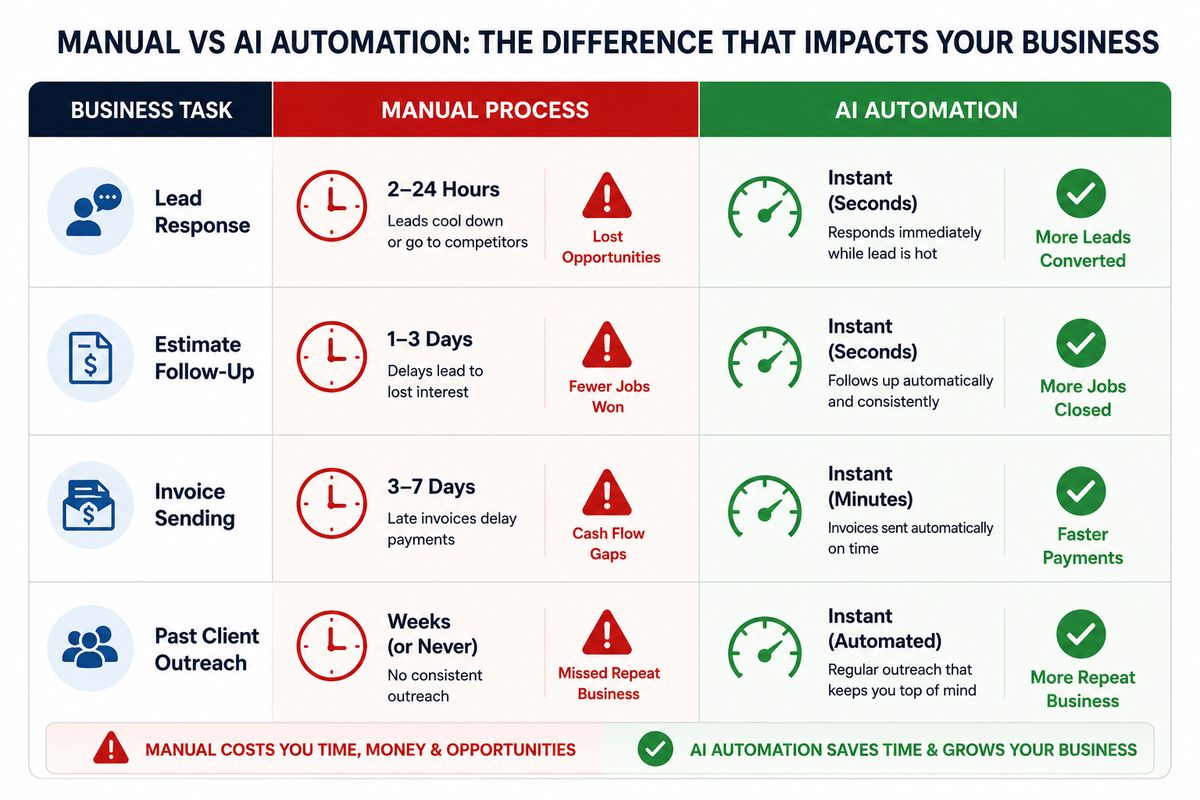
Lead response: Manual: A lead comes in through the website at 8:30 pm. The owner sees it the next morning and responds at 9 am. Over twelve hours have passed. The lead has contacted two other contractors in that window. AI: A lead comes in at 8:30 pm. An automated personalized response goes out at 8:30 pm. The lead hears from the renovation business within sixty seconds while they are still at their computer.
Estimate follow-up: Manual: An estimate goes out on Monday. The salesperson plans to follow up Thursday but gets called to a job site problem. The follow-up happens the following Tuesday, eight days late. The client has already signed with a competitor who called Friday. AI: An estimate goes out on Monday. An automated check-in goes out Thursday. Another value-add message goes out the following Monday. A final follow-up goes out the Monday after that. Every touchpoint happens on schedule regardless of what else is happening in the business.
Invoice payment: Manual: A job is completed on Friday afternoon. The project manager mentions to the office manager that the job is done. The office manager creates the invoice Monday morning and sends it Monday afternoon. A payment reminder is sent two weeks later when someone notices it is overdue. AI: A job is marked complete on Friday afternoon. The invoice is generated and sent automatically by Friday evening. A payment reminder goes out on day three if unpaid. A second reminder on day seven. An escalation notification on day fourteen.
Past client outreach: Manual: A client had their kitchen renovated three years ago. No one remembers. The client hires a different contractor for their bathroom renovation because the original company never followed up. AI: Three years after the kitchen renovation completion date, an automated reminder sequence goes out referencing the original project and opening a conversation about what comes next. The client books a consultation.
These are not edge cases. They are the daily reality of the difference between a renovation business that runs on manual processes and one that runs on AI automation.
Read More: Why the Fastest-Growing Home Service Companies Are Investing in AI
Eliminating Manual Work From Lead Management
Lead management is where most renovation businesses lose the most revenue to manual processes. Leads arrive from multiple sources, are handled inconsistently, and a significant percentage never receive proper follow-up before they go cold.
AI eliminates manual work from lead management across three specific areas.
Automatic lead capture from all sources. Website forms, paid ads, phone calls, and referrals all feed into the CRM automatically. No one has to check multiple inboxes, export lists from ad platforms, or manually enter details from a phone call. Every lead exists in the system within seconds of arriving, regardless of source.
Instant automated response. The moment a lead enters the CRM, a personalized response goes out automatically. The lead hears from the business within minutes regardless of what time they enquired or what the team is doing. This single change consistently improves lead conversion because it removes the window in which the lead contacts a competitor before hearing back.
Automated qualification and follow-up. Instead of a team member manually calling every lead to ask qualifying questions, automated messages gather the information needed to prioritize the pipeline. Multi-step follow-up sequences run over the following two weeks without anyone managing them. Unresponsive leads enter long-term nurture automatically. The sales team focuses their time on conversations that are already warm rather than cold-calling through a long list of unqualified contacts.
Eliminating Manual Work From Estimating
The estimating process contains significant manual overhead at every stage, from scheduling the site visit to following up after the proposal is sent.
Automated consultation booking. When a lead confirms interest in receiving a quote, an automated booking link goes out. The prospect selects a time from the estimator's live calendar. The appointment is confirmed and reminded automatically without any scheduling phone calls or emails.
Proposal delivery and follow-up. Once the estimator inputs the job details after the site visit, the proposal is generated from a template and sent automatically with a digital acceptance link. No manual document formatting. When the estimate has been sent and sits without a response, a structured follow-up sequence runs automatically over the following two weeks. The sequence stops the moment the estimate is accepted or explicitly declined.
Triggered workflows on acceptance. The moment a client accepts a proposal digitally, the deposit invoice is generated, the scheduling team is notified, and the client receives a confirmation message. Three actions that previously required separate manual steps from potentially two different people happen simultaneously and automatically.
Eliminating Manual Work From Job Operations
Running multiple renovation projects simultaneously creates enormous coordination demands when managed manually. Crew scheduling, subcontractor communication, material planning, and client updates all generate manual work that scales linearly with the number of active jobs.
Automatic job record creation. When a deposit is received, a job record is created automatically in the scheduling system with all details from the accepted proposal. No re-entry of information that already exists elsewhere in the system.
Crew and subcontractor notifications. Assigned crew members receive automatic job briefings with full details the moment they are scheduled. When jobs shift, updated notifications go out immediately. The operational communication that previously required a series of phone calls from the scheduling team now happens in seconds without human involvement.
Automated progress tracking triggers. When the project manager marks a phase complete in the system, the next set of operational actions triggers automatically. Material orders for the next phase are flagged. Subcontractors for the upcoming phase are notified. The client update for the completed phase goes out. One stage update in the system generates multiple coordinated actions without anyone managing each one separately.
Eliminating Manual Work From Invoicing and Payments
Cash flow problems in renovation businesses almost always trace back to manual invoicing processes. Invoices that go out late because someone was too busy. Payment reminders that never happen consistently. Overdue accounts that are not escalated until the delay is already significant.
Automated invoice generation. Deposit invoices, milestone invoices, and final invoices are all generated and sent automatically when triggered by the corresponding stage in the project workflow. No one has to open the accounting system and create a document. The invoice goes out when the trigger fires, regardless of how busy the team is.
Payment reminder sequences. Overdue invoices trigger an automatic reminder sequence without anyone monitoring the unpaid list. The sequence runs politely at first and escalates as time passes, following up consistently in a way that manual processes rarely sustain.
Reconciliation and reporting. Payment confirmations are logged automatically, job records are updated, and financial reporting is generated from live data rather than manually assembled from multiple sources. The accounts team sees accurate, current financial information without end-of-week reconciliation exercises.
Eliminating Manual Work From Client Retention
The most neglected category of manual work in renovation businesses is everything that happens, or more often does not happen, after a job is completed. Most renovation businesses focus entirely on winning the next job and rarely have a systematic process for maintaining the relationship with past clients.
Automated post-job sequence. A satisfaction check and thank you message goes out automatically within 24 hours of project completion. No one has to remember to send it.
Review requests. A review request with a direct link to the Google Business profile goes out automatically two to three days after completion, when satisfaction is highest. Not weeks later when someone finally remembers.
Referral requests. An automated referral ask goes out one week after the job. Brief, genuine, and timed at the moment of peak client satisfaction.
Renovation cycle reminders. The system calculates when each past client is likely to need renovation work again based on the space type and completion date, and triggers an automated reminder sequence at that moment. Past clients hear from the business at exactly the right time without anyone tracking renovation cycles manually.
Read More: What We Learned From Talking to Home Service Businesses at InstallerSHOW 2026
How CRM Workflow Automation Ties It Together
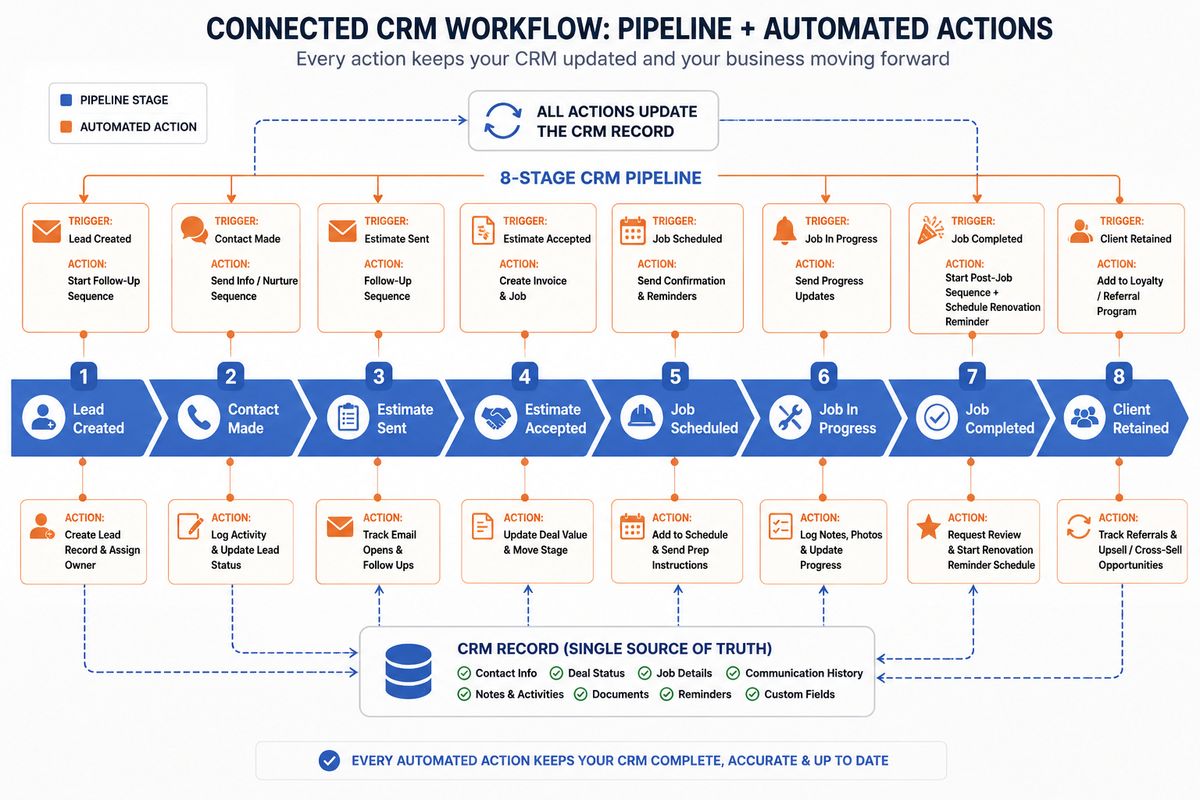
Individual automations save time and recover revenue. A CRM with connected workflow automation transforms how the entire business operates by making data flow automatically between every stage rather than being manually transferred between disconnected tools.
When a CRM is properly configured with workflow automation, stage changes trigger actions. A lead is created, and a follow-up sequence starts. An estimate is accepted, and a deposit invoice is generated. A job is marked complete, and the post-job sequence begins. Every transition between stages produces the appropriate next set of actions automatically rather than waiting for someone to notice and respond.
The CRM also becomes the single source of truth for every lead, job, and client relationship in the business. No information lives in someone's email inbox. No follow-up exists only in someone's memory. No client relationship depends on a particular team member being available to maintain it. Everything is in the system, visible to the whole team, and acted on automatically.
This is the difference between using a CRM as a digital filing cabinet and using it as the operating system of the renovation business. The filing cabinet stores information. The operating system uses that information to drive consistent action across every stage of the business automatically.
How FatCamel AI Eliminates Manual Work for Renovation Businesses
Every area of manual work described in this guide has a specific solution within FatCamel AI, designed around how renovation businesses actually operate rather than requiring the business to adapt to a generic tool.
FatCamel AI connects lead capture, automated follow-up, estimating workflows, job operations, invoicing, client retention, and repeat job systems into one unified platform that runs continuously without daily management from the team.
Pre-built workflows mean the renovation-specific sequences, templates, and triggers are ready to run from day one. The lead follow-up cadences, estimate follow-up timing, job milestone communications, invoice reminder sequences, post-job retention workflows, and renovation reminder systems are all built around how renovation businesses sell and how their clients buy.
AI personalization means every automated touchpoint uses real data from the client record. Property type, project history, budget range, communication preferences. Messages feel individual because they are built from individual data, not applied from a single template.
Two-way CRM sync means every action the automation takes is reflected in the CRM record in real time. The team always sees accurate, current information in the system they already use without checking a separate platform.
A single FatCamel AI dashboard shows the complete operational picture: leads in follow-up, jobs in progress, invoices outstanding, past clients in reminder sequences, and the revenue impact of automation across all of these areas. Every number is live. No manual reporting required.
The result is a renovation business where the three to five hours of daily manual work that was consuming the owner's time and the team's capacity is handled by the system. That time flows back into the work that actually grows the business.
👉 Get a Free AI Revenue Audit for Your Renovation Business at https://www.fatcamel.ai/contact
Frequently Asked Questions
1. What manual tasks can AI actually eliminate in a renovation business?
AI can eliminate manual lead entry, individual lead responses, multi-step follow-up sequences, site visit scheduling, estimate follow-up, crew and subcontractor notifications, client milestone update emails, invoice creation and sending, payment reminder sequences, post-job satisfaction checks, review requests, referral asks, and renovation cycle reminder outreach. Any task that is repetitive, rule-based, and does not require skilled human judgment is a candidate for automation.
2. How does CRM workflow automation work for renovation businesses?
CRM workflow automation works by configuring the CRM to trigger specific actions when leads and jobs move between pipeline stages. When an estimate is sent, a follow-up sequence starts automatically. When a proposal is accepted, the deposit invoice is generated automatically. When a job is completed, the post-job sequence starts automatically. The CRM manages the flow of every lead and job through the business without manual coordination at each transition.
3. Is AI automation expensive for a small renovation business?
The cost of AI automation is significantly lower than the cost of the manual work it replaces. A renovation business spending three to five hours per day on admin tasks at any reasonable labor rate is losing far more to manual work than any automation platform costs. Most renovation businesses that implement a full system see a positive return within the first 60 to 90 days through improved lead conversion, faster payment collection, and recovered repeat business.
4. Does automation make a renovation business feel less personal to clients?
Done correctly, automation makes the client experience more personal rather than less. Clients receive faster responses, proactive project updates, and consistent communication throughout the relationship. AI personalization ensures messages reference real details about the client's specific project rather than sending generic templates. The business becomes more attentive to every client simultaneously, which is the opposite of what manual processes can sustain at any real scale.
5. How long does it take to implement AI automation in a renovation business?
With a purpose-built platform like FatCamel AI, most renovation businesses can have core automation workflows live within one to two weeks. The full system, including LinkedIn outreach, repeat job reminders, and client retention sequences, typically takes two to four weeks to fully configure. Results are measurable within the first 30 to 60 days as the automated follow-up sequences work through the existing pipeline.
6. Can automation handle both residential and commercial renovation workflows?
Yes. The core automation principles apply to both segments, but the messaging, timing, and pipeline structure are configured differently for residential and commercial clients. Residential clients receive warmer, faster-moving communication. Commercial clients receive more professional, longer-cycle outreach that reflects their buying process. A well-configured system runs appropriate workflows for each segment simultaneously.
7. What makes FatCamel AI different from generic automation tools for renovation businesses?
Generic automation tools require significant configuration to work for a renovation business because they are built for broad business use. FatCamel AI is built specifically for trade contractors with renovation businesses as a core use case. The pipeline stages, message sequences, follow-up timing, and workflow triggers are designed around how renovation businesses operate and how renovation clients buy, which means faster setup and better results from day one.
References
https://www.aegisautomations.com/blog/how-to-automate-your-home-remodeling-business
https://theonlinegroup.com.au/ai-automation/how-can-home-renovation-companies-use-ai
https://www.uptech.team/blog/real-estate-automation
https://clientoncue.com/playbooks/automation-ideas-renovation-contractors