
Running a renovation business manually is one of the most exhausting ways to build a company. You are quoting jobs, chasing leads, coordinating subcontractors, following up on invoices, updating clients on project progress, and trying to find new work simultaneously. Most renovation business owners are so deep in the operational detail that growing the business feels like something they will get to when things slow down.
Things rarely slow down. And when they do, it is usually because something went wrong, not because the business has reached a sustainable rhythm.
The renovation businesses growing fastest in 2026 are not working harder than everyone else. They have removed the manual bottlenecks that keep owners trapped in the day-to-day instead of working on the business. Lead follow-up runs automatically. Invoices go out without anyone creating them manually. Job updates reach clients without a project manager writing each one. Past clients receive renovation reminders at exactly the right time without anyone tracking when to send them.
This guide is a complete step-by-step breakdown of how to automate a renovation business from end to end. Every stage of the business has an automation opportunity. By the end of this guide, you will know exactly what a fully automated renovation business looks like and how to build it one layer at a time.
Table of Contents
Why Automation Is the Highest-Leverage Investment in a Renovation Business
Step 1: Automate Lead Capture and CRM Entry
Step 2: Automate Lead Follow-Up and Qualification
Step 3: Automate Estimating and Proposal Follow-Up
Step 4: Automate Job Scheduling and Crew Communication
Step 5: Automate Client Communication Throughout the Project
Step 6: Automate Invoicing and Payment Collection
Step 7: Automate Post-Job Follow-Up and Reviews
Step 8: Automate Repeat Job and Renovation Reminders
How FatCamel AI Connects the Full System
FAQ
References
Why Automation Is the Highest-Leverage Investment in a Renovation Business
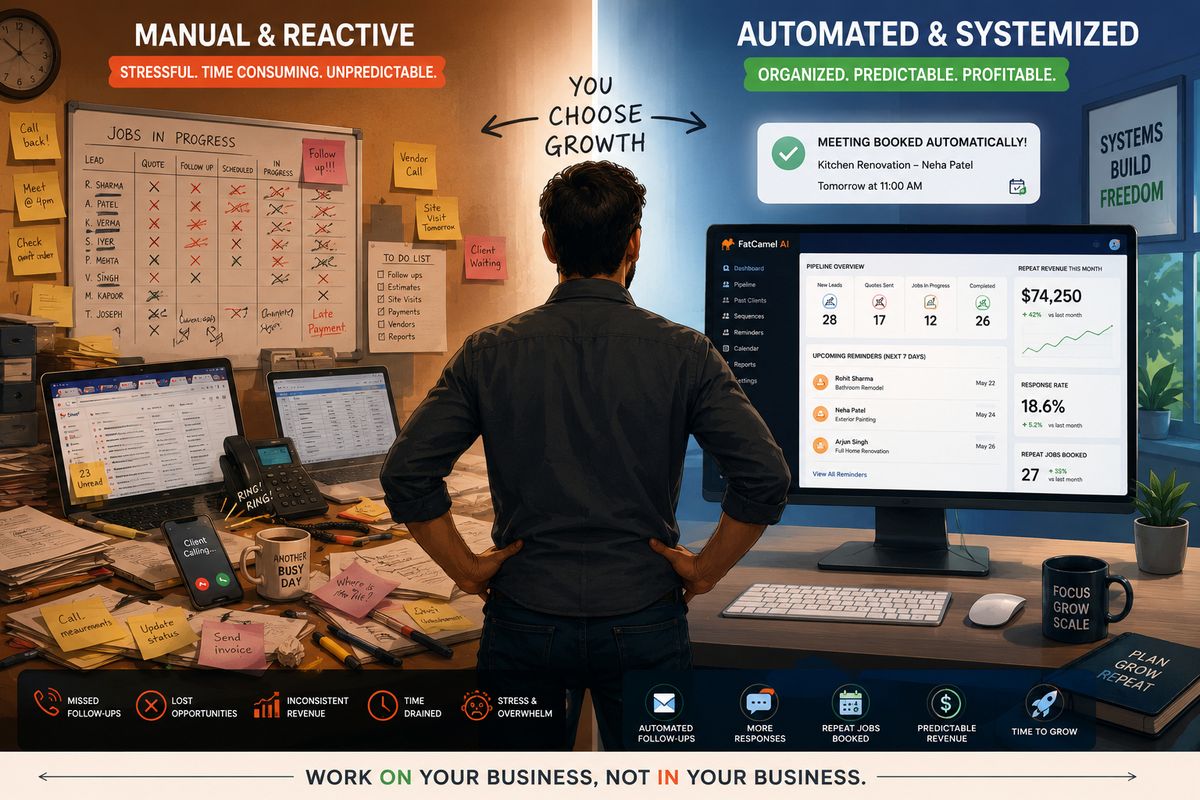
Most renovation business owners think about growth in terms of adding. More leads. More staff. More marketing spend. Automation offers a different kind of growth: removing the manual work that is already slowing the business down.
Every hour a team member spends on a task that a system could handle is an hour not spent on skilled work, client relationships, or business development. Manual lead follow-up, invoice creation, job update emails, and appointment scheduling are all necessary but not skilled. They are repetitive, rule-based tasks that consume significant time without requiring the judgment or expertise that people bring to renovation work itself.
Automation does not remove these tasks from the business. It removes them from the people in the business, so that time flows toward the work that actually requires human skill and judgment.
The return on that reallocation is significant and measurable. Faster lead response produces higher conversion rates. Consistent estimate follow-up recovers jobs that manual processes would miss. Automated invoicing improves cash flow by removing the delays that come from someone forgetting or being too busy. Systematic repeat job reminders generate revenue from past clients that a purely reactive approach would never capture.
The step-by-step system below covers every major automation opportunity in a renovation business, in the order that typically produces the fastest results when built sequentially.
Read More: AI Systems to Get Repeat Renovation Jobs Automatically
Step 1: Automate Lead Capture and CRM Entry
Every automation in the renovation business starts with the lead. If leads are arriving from multiple sources and being manually entered into a spreadsheet, or worse, being left in email inboxes waiting for someone to notice them, every downstream process suffers because the pipeline starts with incomplete, delayed information.
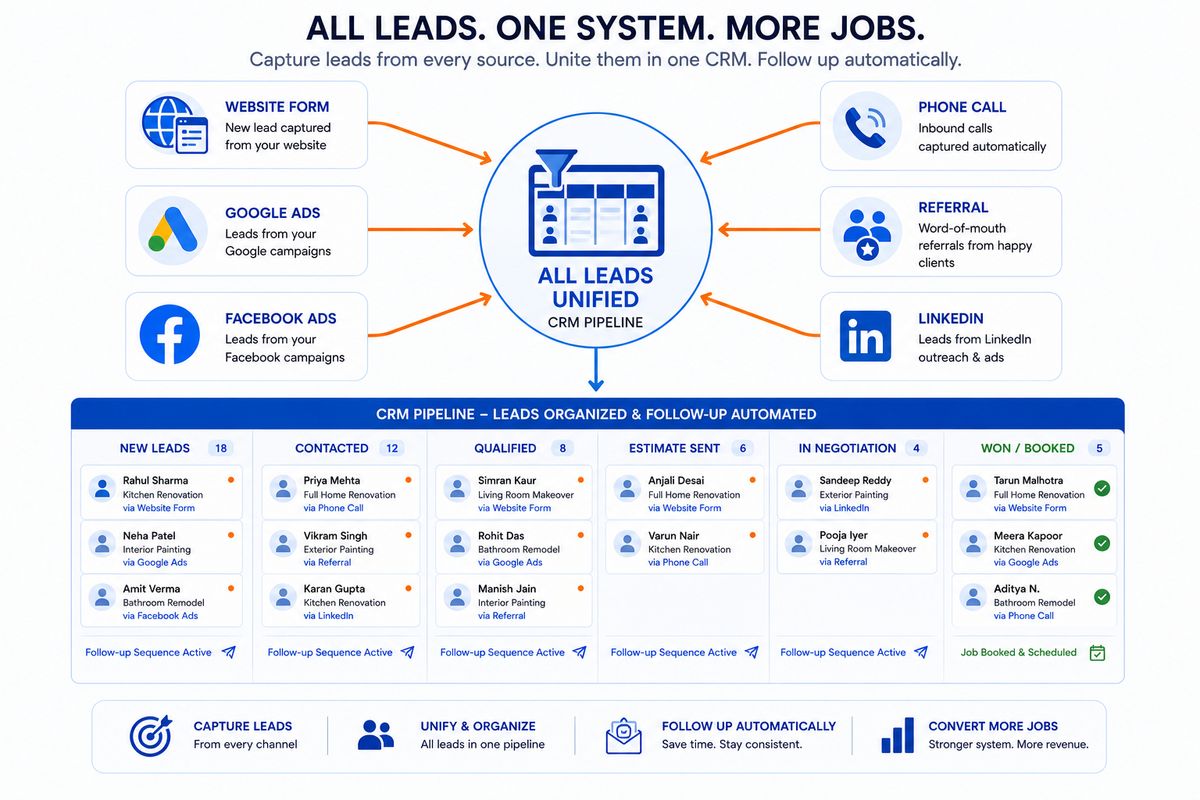
The first automation to build is unified lead capture. Every source of leads- website contact forms, Google and Facebook ads, phone calls, referrals, and LinkedIn outreach- should feed automatically into a single CRM without any manual data entry required.
Website forms connect directly to the CRM through a simple integration. When a homeowner or property manager submits a quote request, a lead record is created instantly with their contact details, the service they enquired about, and the source of the lead tagged automatically.
Paid advertising leads from Google and Facebook sync to the CRM in real time through native integrations. Every lead form submission creates a pipeline entry immediately rather than sitting in an ad platform dashboard waiting for someone to export and transfer it.
Phone calls that go unanswered are captured through call tracking software that logs the number, time, and a recording, and creates a CRM entry flagged for callback. No missed call disappears without a record.
Referral leads are entered through a simple mobile form your team fills out when a referral call comes in. The form takes sixty seconds and puts the lead into the same automated pipeline as every other source.
The practical result of unified lead capture is that every lead exists in one place with a consistent data structure from the moment it arrives, regardless of where it came from, what time it arrived, or who on the team was available when it did.
Step 2: Automate Lead Follow-Up and Qualification
A lead in the CRM is worth nothing if no one follows up. And the speed of that follow-up matters more than most renovation businesses realize. Research consistently shows that responding within five minutes of an inquiry produces dramatically higher conversion rates than responding within an hour.
The moment a new lead is created in the CRM, an automated response goes out via email and SMS. Personalized with the client's name and referencing the service they enquired about. Professional but immediate. This response alone gives the renovation business a significant advantage over competitors who respond hours later.
From that first message, a multi-step follow-up sequence runs automatically. Day one, day three, day seven, and day fourteen touchpoints go out across email and SMS. Each message is different, adding value or addressing a common concern rather than simply repeating the same ask. The sequence adjusts based on engagement: leads who open messages but do not respond receive a slightly more direct follow-up than those who have shown no engagement at all.
Qualification happens within this sequence. Automated messages ask the key questions that help the sales team understand what kind of opportunity each lead represents. Project type, property size, approximate budget, desired timeline. Leads who indicate commercial properties or near-term timelines are automatically flagged as high priority and escalated for more immediate personal attention.
Leads that complete the entire initial sequence without converting enter a long-term nurture track. Monthly touchpoints keep the renovation business present in the prospect's world without consuming any manual effort. Renovation decisions are often planned months in advance. A lead that goes quiet in February may be ready to move in September, and the nurture track makes sure your business is still there when that moment comes.
Step 3: Automate Estimating and Proposal Follow-Up
The estimating process contains two significant automation opportunities that most renovation businesses miss entirely.
The first is the scheduling of site visits and consultations. When a lead confirms interest in receiving a quote, an automated booking link goes out that lets them select a time from the estimator's live calendar. No back-and-forth phone calls or emails to agree on a time. One link, one click, booked. Both the estimator and the client receive automatic confirmation and a reminder 24 hours before the appointment.
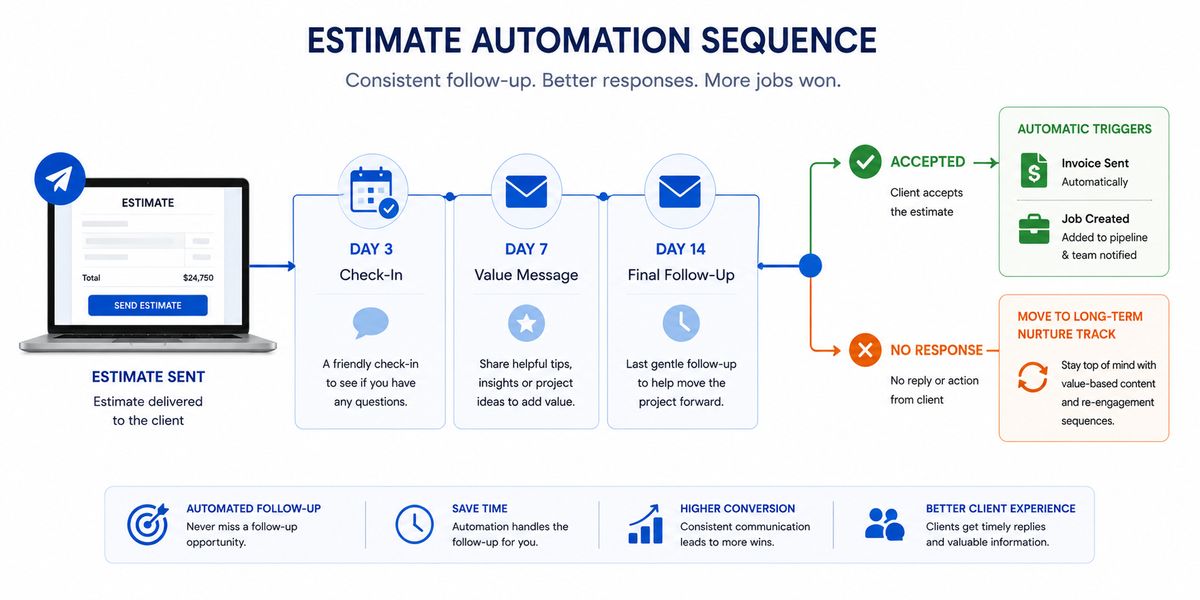
The second and more valuable opportunity is estimate follow-up after the proposal is sent. Most renovation businesses send an estimate, follow up once or twice, and then move on to other active opportunities. The problem is that renovation clients, particularly for larger projects, often need more touchpoints before they commit. A structured, automated follow-up sequence recovers a meaningful percentage of estimates that would otherwise silently convert to a competitor who followed up more persistently.
When an estimate is sent, and the CRM stage moves to Estimate Sent, the follow-up sequence triggers automatically. A check-in three days later. A value-add message at day seven, perhaps a brief note about material lead times or a case study from a similar project. A final, low-pressure follow-up at day fourteen that keeps the door open.
The moment a client accepts the estimate digitally, the sequence stops, and the next workflow begins: deposit invoice generated, scheduling team notified, client confirmation dispatched. Everything that required three manual steps from two different people now happens automatically within seconds of the acceptance click.
Read More: Top Automation Opportunities for HVAC, Plumbing, and Home Service Businesses in 2026
Step 4: Automate Job Scheduling and Crew Communication
Once a job is confirmed and a deposit is received, the operational side of the business kicks in. Crew scheduling, subcontractor coordination, material planning, and timeline management. Done manually across multiple simultaneous projects, this coordination becomes one of the most time-consuming aspects of running a renovation business at any meaningful scale.
When a deposit is received, a job record is created automatically in the scheduling system with all relevant details pulled from the accepted proposal. Project scope, timeline, assigned crew, client contact, property address, and any special access notes transfer without anyone re-entering information that already exists in the system.
Crew members receive automatic job briefings the moment they are assigned. Full job details: address, start time, scope of work, contact details for the client on site, and any access requirements. When jobs shift, updated notifications go out automatically. No phone calls from the office to relay information that the scheduling system already has.
Subcontractors receive the same structured notifications at the appropriate point in the project timeline, with the specific scope relevant to their phase of work. Material procurement triggers or checklists go out to the right team member when a job reaches the preparation stage. Every operational handoff happens through the system rather than through verbal communication that is easily missed or misremembered.
Step 5: Automate Client Communication Throughout the Project
Client communication during an active renovation project is one of the most time-consuming and most frequently neglected aspects of project delivery. Clients want to know what is happening, when to expect each phase, and who to call if they have a concern. When that communication depends on a project manager finding time to write update emails between managing active sites, it becomes inconsistent and often stops entirely during busy periods.
Automated milestone communications solve this by triggering client updates based on stage changes in the project management system rather than depending on anyone remembering to send them.
When the project manager marks Job Started in the system, the client receives an automatic start confirmation with crew details and arrival time. When Week One is marked complete, a progress update goes out. When a significant phase is finished, a milestone notification is sent. When the project is approaching completion, a pre-completion message goes out to manage expectations for the final stage. When the job is marked complete, a formal completion confirmation is sent with next steps.
None of these messages require anyone to write or send them. The project manager updates the stage. The communication goes out automatically. For commercial clients who expect professional, proactive communication throughout a project, this level of consistency is a significant competitive differentiator that most renovation companies cannot sustain manually.
Step 6: Automate Invoicing and Payment Collection
Cash flow is the most consistent operational problem in renovation businesses. Jobs are completed. Invoices go out late because someone was too busy to create them. Payment reminders are inconsistent because chasing payments feels awkward and falls off the list when the team is managing active projects.
Automated invoicing removes the delay and the inconsistency entirely.
Deposit invoices are generated and sent automatically when a proposal is accepted. No one needs to open the accounting system and create a document. The deposit invoice goes out within minutes of acceptance.
For multi-phase renovation projects, milestone invoices are generated automatically when each phase is marked complete. The project manager marks a phase done. The invoice goes to the client within minutes. For larger commercial projects, this alone saves significant accounts team time that would otherwise be spent monitoring project progress and manually creating invoices at each phase.
Final invoices are generated automatically when the project is marked complete, based on the confirmed scope and any approved variations logged in the system.
Payment reminders run automatically for unpaid invoices. A polite reminder at day one past due. A firmer reminder at day seven. An escalation notification to the accounts team at day fourteen. The sequence runs without anyone monitoring the invoice list, which means payment follow-up happens consistently regardless of how busy the team is.
When payment is received, the system sends a receipt to the client, updates the job record, notifies the accounts team, and triggers the post-job workflow automatically.
Step 7: Automate Post-Job Follow-Up and Reviews
The period immediately after project completion is one of the most valuable moments in the client relationship. The work is fresh. The client is satisfied. This is the window when a review is most likely to be written, a referral is most likely to be made, and a maintenance package or future project conversation is most likely to land well.
Most renovation businesses let this window pass because there is no system to capture it. The team moves straight onto the next project. The satisfied client falls off the radar within days.
An automated post-job sequence captures every part of this window systematically.
Within 24 hours of project completion, an automatic satisfaction check and thank-you message goes out. Simple and warm, it confirms the work is done and provides a direct contact for any concerns.
Two to three days after completion, a review request goes out with direct links to Google Business and any other review platforms the renovation company uses. The timing is deliberate: satisfaction is highest in the days immediately after completion, not weeks later when the experience has faded.
One week after the job, a light referral request goes out. Brief, friendly, and not pushy. A simple acknowledgment that if anyone in their network is thinking about a renovation, an introduction would be genuinely appreciated.
Where appropriate, a maintenance contract offer goes out as the final message in the post-job sequence. Timed to arrive when the client is still thinking about their property investment, it converts a meaningful percentage of past clients into ongoing contract holders.
Read More: How Renovation Companies Can Get More Commercial Clients Using AI
Step 8: Automate Repeat Job and Renovation Reminders
The final and highest lifetime-value automation in the renovation business is the system that brings past clients back for their next project.
Every job completed is logged with the completion date, space type, and scope of work. The system uses this data to calculate when that client is likely to need renovation work again based on the typical lifecycle for that space type. Kitchens and bathrooms refresh every five to seven years. Commercial office spaces refit every four to six years. Living spaces refresh every five to ten years depending on occupancy and use.
When the calculated reminder date approaches, a multi-step outreach sequence begins automatically. Personalized with the specific space that was renovated, the time since completion, and a relevant conversation opener about what typically comes next at this stage. The sequence runs across email and SMS, with the channel mix adjusted based on how the client engaged with post-job communications.
Any client who responds enters the sales pipeline immediately with full project history attached. Any client who completes the sequence without responding moves into a quarterly re-entry track that sends a brief, relevant touchpoint every three months until they either re-engage or the relationship is explicitly closed.
For commercial clients, the reminder system also includes a portfolio review touchpoint timed around budget approval cycles, offering a planning conversation rather than a direct renovation pitch, which is a significantly more effective frame for commercial buying decisions.
How FatCamel AI Connects the Full System
Each of the eight steps above is a meaningful automation on its own. The full return on automation comes when every step is connected into one continuous system where data flows automatically between every stage and nothing requires manual coordination to move forward.
FatCamel AI is built to run the complete automation system for renovation businesses, connecting lead capture, follow-up, estimating, job operations, invoicing, client retention, and repeat job generation into one unified platform designed specifically for trade contractors.
Unified data flow means a lead that comes in on a Sunday evening is followed up automatically before anyone arrives at the office Monday morning. An accepted estimate triggers the operations team notification, the deposit invoice, and the client confirmation without anyone making three separate decisions. A completed job triggers the post-job sequence, the final invoice, and the renovation reminder schedule simultaneously.
Pre-built workflows for renovation businesses mean the sequences, templates, and pipeline stages are designed around how renovation clients actually buy and how renovation businesses actually sell. Not a generic automation tool adapted for the trades. A system built for them.
AI personalization at every touchpoint means every automated message, from the initial lead response to the renovation reminder two years later, uses real data about the client and their project to feel specific and relevant rather than templated.
A single FatCamel AI dashboard shows the health of the entire business operation: active leads in follow-up, jobs in progress, outstanding invoices, upcoming renewals, and past clients in reminder sequences. Every number is live. No manual reporting. No pulling data from multiple systems.
Once configured, FatCamel AI runs the full system continuously without daily management from your team. The renovation business operates on autopilot for everything that can be automated. Your team focuses their time on the skilled, human work that a system cannot replace.
👉 Get a Free AI Revenue Audit for Your Renovation Business at https://www.fatcamel.ai/contact
Frequently Asked Questions
1. What does automating a renovation business actually mean in practice?
Automating a renovation business means using software and AI tools to handle the repetitive, rule-based tasks that currently consume manual time: lead follow-up, estimate chasing, client update emails, invoice creation, payment reminders, review requests, and repeat job outreach. The goal is not to remove people from the business but to remove the routine work from their schedule so their time goes toward skilled work, client relationships, and business development.
2. What is the most important workflow to automate first in a renovation business?
Lead follow-up and estimate follow-up deliver the fastest measurable return because they directly affect revenue. Most renovation businesses are losing a significant percentage of leads to slow or inconsistent follow-up and losing estimates because the follow-up cadence stops too early. Automating these two workflows first produces a visible impact on conversion rate within the first 30 days, which creates momentum and justifies building the full system.
3. How does workflow automation help contractors manage multiple projects simultaneously?
Workflow automation in job operations means crew notifications, client milestone updates, and operational handoffs happen based on system triggers rather than someone remembering to communicate them manually. This allows a renovation business to run multiple active projects simultaneously with consistent client communication and crew briefing across all of them, without proportionally increasing the project management overhead.
4. Does automation require technical skills to set up and maintain?
With purpose-built platforms like FatCamel AI, no. The implementation involves defining workflows, configuring sequences, and connecting communication channels, all through a setup process managed by the FatCamel AI team for your specific business. Once live, the system runs without technical management from your team. You receive a dashboard showing what the system is doing and what it is producing.
5. How much time does business automation save for a renovation contractor?
The time savings depend on business size and which workflows are automated, but renovation businesses that implement a full automation system typically recover between five and fifteen hours of admin time per week. For a business owner, that time can be redirected to higher-value activities. For the team, it means more capacity for active project work without adding headcount.
6. Can automation work for both residential and commercial renovation businesses?
Yes. The core automation workflows apply to both segments but the messaging, timing, and pipeline structure differ. Residential clients move faster and respond to warmer, more personal communication. Commercial clients have longer cycles and need more professional, operationally-focused outreach. A well-configured system runs separate workflows for each segment so every client receives the right experience.
7. What does a fully automated renovation business look like day to day?
In a fully automated renovation business, the owner and team arrive each morning to a dashboard showing what the system handled overnight: leads followed up, estimates chased, invoices sent, review requests delivered, past clients re-engaged. The team focuses their attention on active projects, consultations, and the decisions that genuinely require human judgment. New revenue is being generated in the background by a system that never takes a day off.
References
https://www.aegisautomations.com/blog/how-to-automate-your-home-remodeling-business
https://theonlinegroup.com.au/ai-automation/how-can-home-renovation-companies-use-ai
https://www.uptech.team/blog/real-estate-automation
https://clientoncue.com/playbooks/automation-ideas-renovation-contractors